
A computer network is a set of at least two devices (computers, smartphones, printers, servers, etc.) linked together by cable or wireless in order to exchange data and share resources.
Summary
- A computer network connects two or more devices to exchange data and share resources.
- At home, the router (the box) connects your devices to each other and to the Internet, by cable or Wi-Fi.
- In the client/server model, the client sends a request and the server responds; In a peer-to-peer network, participants are on an equal footing.
- Network protocols regulate communication, IP addresses (IPv4 and IPv6) identify devices.
- Networks are classified according to the mode of transmission (wired or wireless) and according to their range (PAN, LAN, MAN, WAN, GAN).
After purchasing a new computer, it’s likely that the first thing you do is try to connect it to the Internet. To do this, you will establish a connection with the router (the box from your access provider), which receives data from the Internet and transmits it to the computer.
But that’s not all, you may also want to connect a printer, your smartphone or your television to the router so that these devices are also connected to the Internet. You will therefore have networked multiple devices via a central switching point and thus create your own network.
But what does this mean exactly?
IONOS GPT
Your sovereign AI assistant to boost your productivity
Request, create and search securely and without limits for chat with IONOS GPT: the sovereign and affordable alternative to ChatGPT and other conversational assistants.
What is a computer network?
In information technology, a network is defined by the connecting at least two computer systems by means of a cable or wirelessly, by radio link. The most basic network has two computers connected by a cable. In this case we also speak of network peer to peer (P2P) or in French peer to peer. This type of network has no hierarchy: both participants are at the same level. Each computer has access to the other’s data and they can share resourcessuch as a storage disk, programs or peripherals (printer, etc.).
Modern networks are generally a little more complex and involve much more than just two computers. As soon as the network grows or resources need to be managed centrally, a configuration such as client/server. In this model, a computer acting as a central switching point (server) makes its resources available to other network participants (clients).
Definition: Computer network
A network is a group of two or more computers or other electronic devices allowing the exchange of data and the sharing of common resources.
Network example: home Wi-Fi network
The Wi-Fi network (WLAN, for Wireless Local Area Network) home is a good example of a small local network. The various devices present in the home are linked by radio to the router, which acts as a central node within the house. In turn, the router is then connected to a much larger network: the Internet.
As the devices are connected to the router, they can access the Internet, since they are part of the network. What’s more, the devices can also communicate with each other without the need to establish a direct connection each time. For example, a computer can send a print job to a Wi-Fi-enabled printer without needing to plug the printer into the computer.
Before networks took hold in their current form, communication between computers and devices was complicated, to say the least. The computers were connected using dedicated cables. Of the switches Mechanical devices were necessary to use peripherals together. Additionally, because of the physical limitation (cable length) this implied, computers and peripherals always had to be placed next to each other.
Note
If you want a particularly stable connectiondespite the practical advantages of Wi-Fi, it is preferable to connect the router and the various devices by a wired connection (Ethernet cable).
What are the functions and advantages of a network?
The main function of a network is to provide participants with platform for thedata exchange and thecommon use of resources. This function is of crucial importance, so much so that today it would be very difficult to imagine our daily lives and the current world of work without the existence of networks.
Here is a concrete example. In an office, each workstation has its own computer. Without computer networking, it would be very complicated for a team to collaborate on a project, because there would be nocommon space to share and deposit digital documents and information, and collaborators would not be able to use certain programs together as they are used to.
Furthermore, in many offices there is only one or a few printers, which are used by everyone. Without a network, each computer would have to be connected to the printer, which would be very tedious. A network cleverly solves this problem, since all computers are connected to the printer via a central node.
The main advantages of networks are therefore:
- Data sharing
- Resource sharing
- Centralized management of programs and data
- Centralized data storage and backup
- Sharing computing power and storage capacity
- Simple administration of permissions and responsibilities
In a classic client/server type network, there is a central switching point, the server. The server is connected to the other devices, which are called customers. The connection can be wired (LANfor example in Ethernet) or wireless (WLANor Wi-Fi).
In a typical home network, the router plays the role of central point. It is connected to the Internet and makes this access available to other devices (computer, smartphone, etc.).
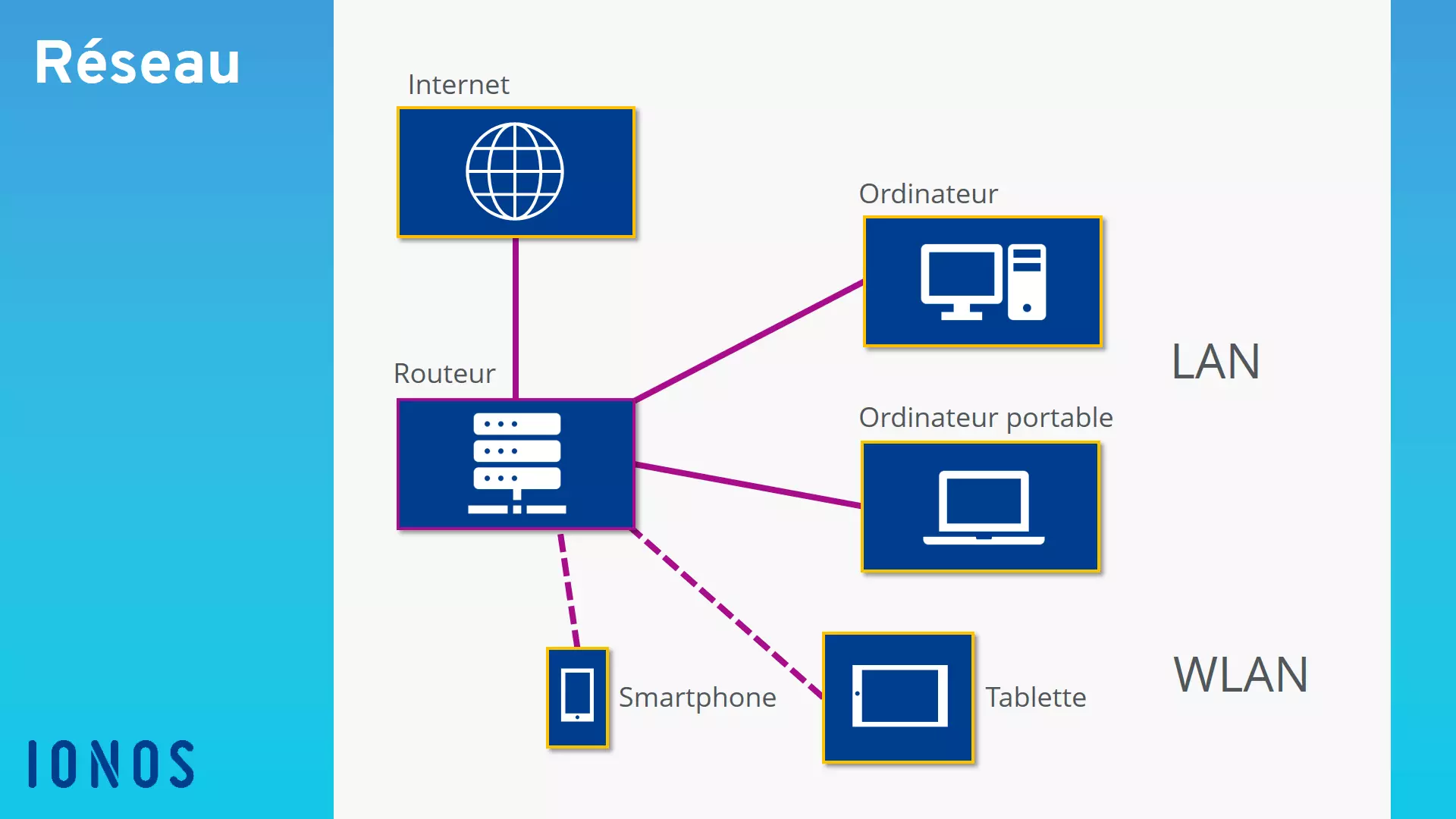
Graphic: structure of a home network
Client/server architecture
In networks of a certain size, for example in a company, the server is most often a central computer. This computer does not run ordinary applications and programs, but special server software and services. The server must be running constantly, unlike the other computers (clients), which can be turned off.
In this kind of server-based network, the communication between the server and the client is carried out as follows: the client first sends a request (request) to the server. This examines the request and then returns the data (response) wanted. In this model, it is always the client who contacts the server, never the other way around.
Network protocols
Network protocols ensure the smooth running of communication between the different components of the network. They regulate data exchangedetermine how communication is initiated and terminated and what data is transferred. Typically, there are several network protocols, each of which assumes a given subfunction and is arranged hierarchically in layers.
Network addresses
Besides this, it is important to ensure the correct assignment of the transmitter and receiver. For this purpose, so-called network addresses are used. Within the network, each computer generally has an IP address that uniquely identifies it, like a telephone number. This internal IP address (private) is only used for communication between members of the local network. To communicate on the Internet, we use instead external IP addresses (public), which are automatically assigned by Internet service providers, for example Orange, Free, SFR or Bouygues Telecom.
We distinguish the IPv4 and IPv6 addresses. IPv4 addresses have long been the standard, but their number is limited to around 4.3 billion. Following the massive expansion of the Internet, additional IP addresses had to be urgently found. It is with this in mind that the IPv6 standard was developed, which allows up to 3.4 x 1038 addresses, in other words 340 sextillion. The two standards coexist today, and IPv6 is gradually taking over.
For more details on the IP protocol and its importance in computer networks, read our article What is the IP protocol?.
What types of networks exist?
Most often, we categorize networks into different types of networks depending on the mode of data transmission and their scope.
Mode of transmission
Concerning the mode of transmission, we distinguish between wired networks and the wireless networks. WLANs, which are based on the IEEE 802.11 standard (international name: Wi-Fi), and mobile networks (4G, 5G), used by mobile phones and smartphones, are examples of wireless networks. Wired networks, such as Ethernet, fiber optic or coaxial cable, transmit data over cables. In France, ADSL, which is based on the copper network, is now a thing of the past: its marketing ended in the majority of municipalities on January 31, 2026 and the copper network must be completely closed by the end of 2030.
Scope
For network scope, the following categories are used:
| Network type | Scope and usage | Examples |
|---|---|---|
| Personal Area Network (PAN) | Networking of devices within a restricted area, up to approximately 10 meters | Bluetooth, Apple AirDrop ad hoc Wi-Fi service |
| Local Area Network (LAN) | Local networks, among the most widespread | Homes, small and medium businesses |
| Metropolitan Area Network (MAN) | Network found in cities or regions | Network of a city or region |
| Wide Area Network (WAN) | Wide network, beyond a city | Interregional mobile telephone or Internet access network in France |
| Global Area Network (GAN) | Global network | Internet |
Note that these different types of networks partly overlap. The user of a Wi-Fi network is at the same time part of a WAN or a GAN as soon as he is connected to the Internet.