
People added by CC in an email (Carbon Copy) only receive a copy of the message for information purposes, while the other participants in the conversation are contacted directly. As the addresses indicated in the “Cc” field are visible to all recipients of the email, it is important to use this addressing function wisely, particularly in a professional context.
Summary
Cc (Carbon Copy) sends a copy of an email to other people for informational purposes – their addresses are visible to all recipients.
- Cc: recipients of the “Cc” field receive the message for information only; an active response is generally not expected.
- Cc vs Bcc: with Bcc, addresses remain invisible to others; with Cc, they are visible to everyone.
- To field: it contains the main interlocutors, from whom you generally expect a reaction.
- Data protection: Email addresses are personal data – so use Cc only within internal teams, for known mailing lists, or when transparency is expressly desired.
- Typical errors: Unnecessary “Reply All” channels, unclear responsibilities, unintentionally leaked mailing lists, and faulty auto-completion.
Professional email address
Discover a new way to process your emails
-
Email address in your name
-
AI features to write perfect emails (optional)
-
Secure messaging with spam protection
What is Carbon Copy (Cc) in an email?
Carbon Copy corresponds to an additional address field in the header of an email. Recipients added by Cc email receive a copy of message. Their email address is visible to everyone participating in the conversation, like the addresses indicated in the “To” field.
The term comes from paper correspondence: using carbon paper, it was once possible to create copies of a document. In electronic communication, the “Cc” field uses this function in digital form. On a technical level, Cc recipients are indicated in the email header and treated by the mail server as traditional recipients. Their email address is transmitted visibly, like the addresses appearing in the “To” field. The difference therefore does not concern the delivery of the message, but its role in communication.
Email marketing
Create newsletters and generate sales
-
Fast design using AI and many templates available
-
Synchronization with your IONOS e-commerce solution
-
Sending simple, GDPR-compliant emails
What is the difference between Cc and Bcc?
When writing an email, you have three address fields:
- To (To): This field indicates the primary recipients. These are the people you speak to directly and generally expect a reaction from.
- Cc (Carbon Copy): recipients added in the “Cc” field of the email receive the message for information. They read the content, but are not at the center of the communication. The email addresses of the added recipients are visible to all recipients of the message.
- Bcc (Blind Carbon Copy): This field is used for sending hidden copies. Recipients added with the Bcc function remain invisible to other people receiving the email.
While the “To” and Cc email fields are distinguished primarily by their role in communication, the essential difference between Cc and Bcc lies in the visibility of email addresses. Careful use of these fields helps avoid misunderstandings, unnecessary reply chains and data protection risks.
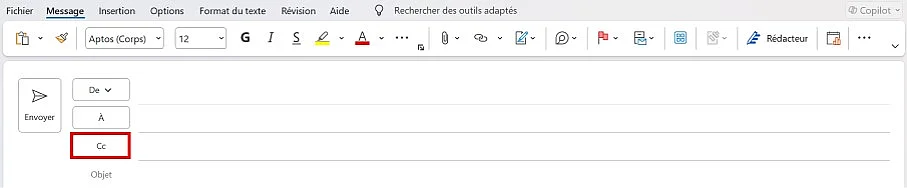
Enter the contacts who only need to read your message in the “Cc” field.
What should you pay attention to when using the Cc function?
Whether you provide a recipient address in the “To” field, Cc email, or Bcc should depend on the following two questions:
- Is the recipient the main contact person email?
- Can and should the email address be visible to all recipients ?
Distinguish primary recipients from Cc recipients
In the “To” field, you address your message to the people primarily concerned. You thus indicate that they are directly contacted and that they must possibly react. Recipients added in the “Cc” field receive the message for information only; we also talk about courtesy copy. A response from them is generally not expected.
Advice
In an email, the Cc function should be used with discernment and only when necessary in order to avoid overloading inboxes and limit misunderstandings.
Cc contacts are always visible
The addresses indicated in the “To” and “Cc” fields are visible to everyone receiving a message. This can be a problem when these people do not know each other or have not given their consent for their email address to be transmitted. Email addresses are considered personal data. Their disclosure via the “Cc” field without consent may, particularly in certain professional contexts, pose a problem with regard to data protection requirements such as the GDPR.
So use the “Cc” field only:
- Within internal teams
- For known mailing lists
- Or when transparency is explicitly desired.
Advertising emails, newsletters or circulars sent to large external groups should not be sent by CC. Instead, use professional email marketing software, a mail merge feature, or the “Bcc” field to protect the privacy of recipients.
Email marketing
Create newsletters and generate sales
-
Fast design using AI and many templates available
-
Synchronization with your IONOS e-commerce solution
-
Sending simple, GDPR-compliant emails
What are typical errors when using the Cc function of an email?
Structured use of address fields significantly improves the professionalism of your email communication. So avoid the following typical mistakes when using the “Cc” field:
- Unnecessary “Reply All” channels: Cc recipients are often unintentionally included in long reply chains.
- Unclear responsibilities: When there are many addresses in the « To » field, it is not clear who should respond to the message.
- Unintentional disclosure of mailing lists: This can be particularly problematic with clients, clients or business partners.
- Input error linked to auto-completion: Modern email software automatically offers saved contacts. Selecting too quickly can result in sensitive information being sent to the wrong people.