

Blacklists protect users against unwanted emails such as spam. Internet service providers and external service providers use artificial intelligence, which is capable of recognizing recurring, similar or falsified patterns. The generated filters place senders on blacklists.
Note
The term “blacklist” is established in a technical context. Although it has a bad connotation, its origin is not motivated by racism. We use it here in the technical sense.
What is a blacklist?
The term “blacklisting” refers to a process where addresses of spam senders are identified And blocked for subsequent sending of information. They are then automatically placed on a blacklist for spam. Such a blacklist includes email addresses, domain names or IP addresses. Blacklisted senders cannot send other messages to email accounts that use this list. Email blacklists are managed in real time. The opposite of blacklisting is whitelisting. Greylisting is also an effective method to combat spam.
Blacklisting can be compared to a sieve: elements that are too large (or false) in the flow remain blocked. What is small enough (therefore correct) passes and arrives lower. Blacklists use a broad set of tools to sort unwanted strings. These lists include the IP address of a provider or individual computer, the domain name, or programs and file extensions that are considered or classified as untrustworthy.
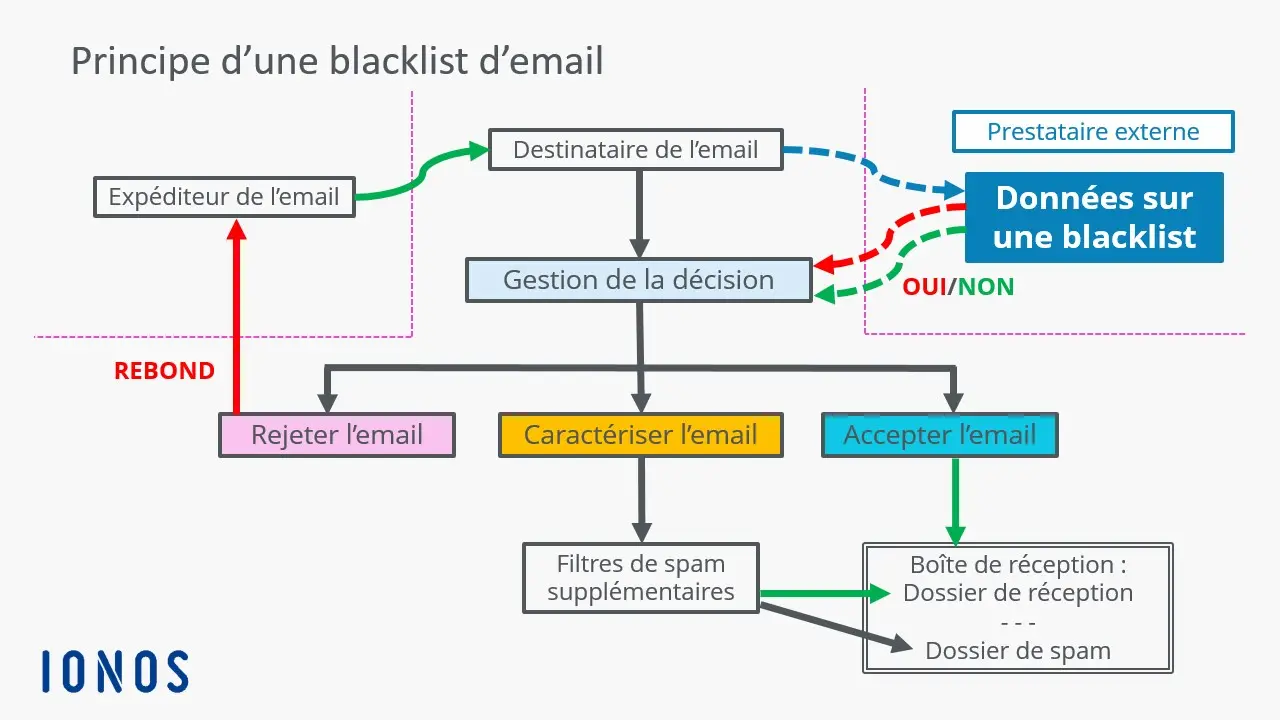
The way blacklists work, despite all security, also presents disadvantages : for example, it only offers reliable protection when the contents to be rejected are known and blacklisted. Threats are only prevented once the blacklist has been updated. Unlike automatic spam detection models, this involves maintenance efforts for administrators.
Secure email address for your digital privacy
- Professional data protection and security
- Email encryption with SSL/TLS
- Antivirus protection with firewall and spam filters
- Daily backups, daily protection
Which blacklists are relevant?
Blacklists are in most cases created by the email providers themselves. In addition to provider-specific mechanisms and services, there are a large number of public providers that act as a “spam police”. They maintain spam filters and blacklists and notify you with appropriate messages when a sender address is on a list, or ensure that corresponding emails are blocked.
Among the most important email blacklists are:
| Blacklist | Operator | Special features |
|---|---|---|
| Spamhouse | The Spamhaus Project | Renowned and maintained list; “quasi”-standard, anyone listed there encounters notable problems in email delivery |
| Spamcop | Cisco Systems | Rapid response to spam; often used in combination with other lists |
| Cloudmark Sender Intelligence (CSI) | Proofpoint | Widely used by large ISPs; reputation-based, less transparent |
| Invaluation | Invaluation | Commercial listing focused on low misclassification rates; 7 day trial period |
| Passive Spam Block List (PSBL) | PSBL-Community | Light list based on Spamikaze; good deliverability rates and simple deletion options |
| Abusix Mail Intelligence | Abusix | Dynamic DNS Black Listing (DNSBL) with increasing relevance; particularly popular with Internet service providers and hosting providers |
Note
Many of the blacklist providers mentioned offer the possibility of checking whether your email address is included in their respective lists.
Spam filters evaluate incoming content based on a point system. A certain number of points, different for each supplier, ensures that the sender is placed on the blacklist. Here are some reasons why you might be put on an email blacklist:
- Suddenly sending emails to recipients who have been inactive for a long time or to those who marked emails from this sender address as spam. The same applies when the email is bounced.
- Sudden increase in quantity of emails sent, especially when calendar occasions such as summer sales, public holidays, Black Friday and the like are at the origin.
- Drastic increase in sending frequency without prior announcement. A large number of spam complaints will almost certainly land a sender on a blacklist.
- Sending from a particularly large email marketing list : the anti-spam filter then suspects list purchase. Good lists, well maintained, grow continuously and not suddenly.
- Manipulated entries in email headers, especially the « From: » and « Bounce Address » lines to create fake identities of spam senders.
8 tips to avoid being on a blacklist
Respect certain rules when sending emails can avoid being registered on a email blacklist. Particular attention is paid by the “spam police” to mass senders such as newsletter services. They must be very vigilant against content suspected of spam.
With a few tipsyou can avoid ending up on a email blacklist :
- Generate varied contents. Those who always use the same wording are quickly suspected of being spam robots.
- Get it explicit consent of your recipients.
- Send your marketing emails via secure servers certified suppliers and use a professional software.
- Do not use no personal email addressesbut rather the name of your company or brand. Before the @ sign, avoid personal names and prefer terms like “shop”, “newsletter” or “contact”.
- Register with “ allow lists « , or authorization lists, for example using the words « Save our contact in your address book » or similar wording.
- Do not send emails that only contain imagesbecause these are considered empty and listed by spam filters.
- Avoid wording that gives emergency printfor example “Only three days left: book now!” », or to offer financial support of any kind.
- Avoid using only capital lettersotherwise you will most likely end up on a email blacklist. Using many consecutive exclamation points can also cause you to be categorized as spam, as can content related to gambling or certain medications.
Note
Commercial providers in particular must also meet regulatory requirements when sending emails. These include the mandatory legal notices and a link allowing the recipient to unsubscribe from the mailing list.
What to do if you are on a blacklist?
A recording on a blacklist is not set in stone. There are many such lists, so it's not that unlikely to find your way through them. This may indicate that your email marketing needs improvement. If your domain has only a few entries in a blacklist, traffic will be little affected. But if your domain appears on many blacklists, there is need to act. If your verified domain or IP address is on a blacklist, you will usually find a link to the provider, which will tell you how to get removed from the list.
Email marketing
Create newsletters and generate sales
- Drag-and-drop and AI features for intuitive design
- Many professional models to choose from
- Sending simple, GDPR-compliant emails
Create your own email blacklist (e.g. with IONOS)
If you own your own domain, many providers give you the ability to create and manage a email blacklist for your contacts. In the email address management panelunwanted senders can be added to a blacklist. These emails are then automatically moved to the spam folder.
At IONOS, you can create a blacklist for your own email account in the following way:
- Log in with your credentials on IONOS Webmail.
- Click on the gear icon at the top right, then on “ All settings » to open the settings.
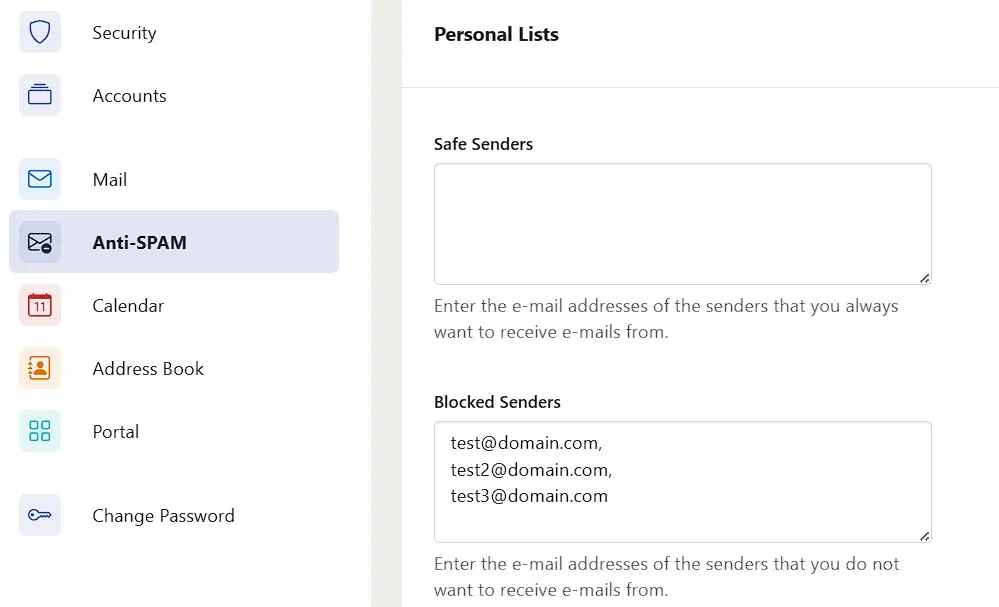
- In the left menu, go to the “ Anti-SPAM « .
- Scroll down to the “ Personal lists » and enter under “ Blocked senders » the email addresses you want to block.
Note
You can block not only individual addresses, but also entire address sets. For example, if you want to place all emails from the domain @domain.fr on your blacklist IONOSjust enter *@domain.fr. The asterisk allows you to include all email addresses.


