
Where to store photos for optimal backup: on a hard drive, external storage media, optical media or in the Cloud? We summarize the different photo storage options and explain when a Cloud solution is the best choice for securing and organizing your images while ensuring easy and reliable access.
Why is it important to store photos?
For individuals, this is extremely frustrating; For professional photographers, it’s a disaster scenario: losing their digital photo collection. Whether it’s a technical fault, carelessness, malware or theft, if images disappear, many memories and photos are lost, and in the worst case, even professional projects carried out for clients.
Data loss is often caused by:
- Hardware failures of smartphones or hard drives
- Accidental deletion of files
- Malware or ransomware
- Theft or loss of a device
- Software errors or system crashes
This is why backups regular are essential for storing photos securely and ensuring reliable photo storage.
Managed Nextcloud
Cloud storage that puts you in control
-
Effectively protect your data with industry-leading security
-
Save time on updates and maintenance
-
Easily add apps and collaboration tools
Cloud vs offline: what are the advantages and disadvantages?
Backing up data, and therefore also photos, has evolved profoundly with different storage media. This is due in particular to the fact that the file size of digital photos has continued to increase.
In professional photography, devices with large sensors and high resolution are often used. When photographing at RAW formatthis generates particularly large files which, depending on the device resolution and compression, range from around 20 to over 100 megabytes per image.
Photos taken with a smartphone have also become significantly heavier and often require 5 to 15 MB of storage space per image. In most cases, the available space becomes insufficient after a certain time; it is therefore necessary to resort to other supports and solutions to store photos and secure them.
Nowadays, the storage media the most common are:
Note
Transfer speed is a factor that should not be overlooked. USB 3.2 ports offer up to 20 gigabits per second, while USB 4.0 (USB-C) offers a maximum throughput of 40 gigabits per second.
What are the advantages and disadvantages of different storage media?
The best-suited storage medium for storing photos depends on factors such as capacity, speed, mobility, and security.
| Storage media | Benefits | Disadvantages |
|---|---|---|
| Cloud Storage | Large storage capacity, always available, server maintenance by secure data centers, automated backups, access from different devices | Partially paid, Internet connection required |
| Hard disk (SSD) / USB key | Fast, robust and compact | Lifespan limited to ten years, lower capacities |
| Hard disk (HDD) | Inexpensive storage per GB, relatively high capacities | Mechanically fragile, heat generation, lifespan of five to ten years |
| Memory cards | Small and mobile | Lifespan of approximately five to ten years |
| PC/laptop | Internal hard drive usually included | No real backup in case of device failure or loss |
| SIN | Centralized storage for multiple devices, automated backups, large capacity, scalable | Higher acquisition costs, configuration and maintenance may require technical knowledge, risk in the event of local damage (e.g. fire or flooding) |
Specialists today recommend a combination of several storage methods. The Cloud and local backups complement each other particularly well to ensure the security and availability of photos.
Photo backup strategies: what is the 3-2-1 rule?
If you want to store photos securely, you need to follow a proven backup strategy. In IT security, the 3-2-1 backup rule is considered a universal standard. With the following combination, your photo collection remains preserved even if a device is damaged or lost.
The rule states:
- 3 copies of your photos (original + 2 backups)
- 2 different storage media (e.g. computer and external hard drive)
- 1 copy in another location (e.g. Cloud)
For example, a typical implementation might look like this:
- Original photos on computer or smartphone
- Saving images to an external hard drive
- Additional photo backup in the Cloud
Advice
In everyday life or on vacation, most photos are taken with a smartphone. Many Cloud services therefore offer automatic upload functions: as soon as you have a stable Internet connection and backup is activated, new photos are directly transferred and stored in the Cloud. You no longer have to think about manual backups. Your precious memories are continuously backed up and remain available even if your device is lost or damaged.
Cloud storage solutions are among the most popular options for photo backup today. Images are stored on external servers and can be viewed from different devices. An example of this type of cloud storage is HiDrive Next from IONOS. This does not just store files centrally: it combines the automatic synchronization of different storage locations with various safety devices.


The most important functions include:
- Access files via browser, desktop software or mobile apps
- Automatic synchronization between devices
- Sharing files via links
- Automatic backups from devices or network storage
- Integration via protocols such as WebDAV, SFTP or SMB
- Security features like two-factor authentication or encrypted data transfer
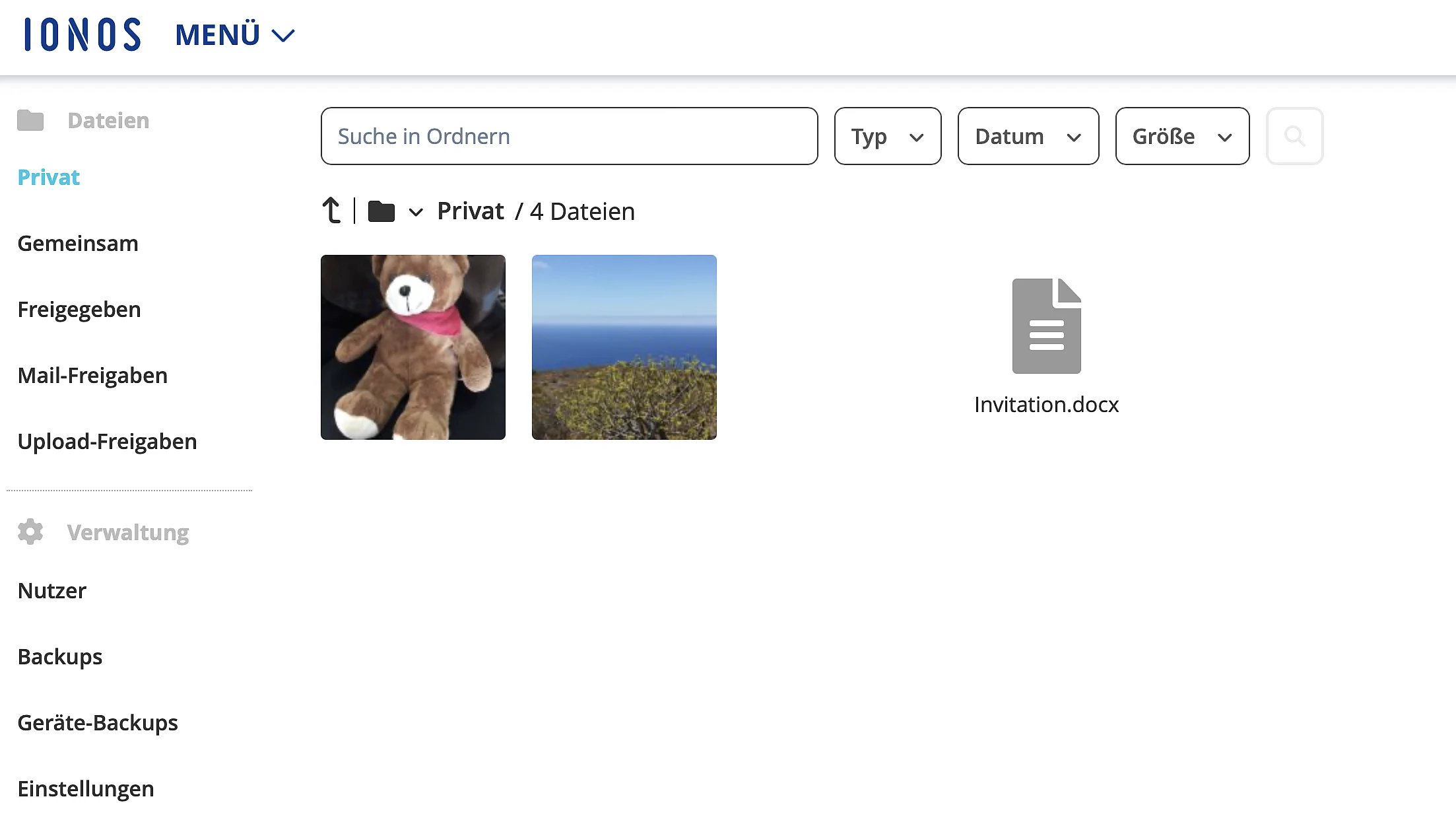
Back up your images and work files in the Cloud or simply free up space on your smartphone, without risk of data loss.
A flexible solution for storing photos and other files is the NAS (Network Attached Storage). It is a network-connected storage space that saves photos, videos and other files centrally within the home or office network and makes them available to multiple devices. Unlike an external hard drive, a NAS is accessible via LAN or Wi‑Fi and thus functions as a Private cloud at home.
This means that smartphones, tablets and computers can simultaneously access stored photos, save new images and retrieve already archived photos, without the need to manually transfer data to each device.
Typical advantages of a NAS system for photo storage:
- Centralized storage location: All photos are saved in one place on the network and can be accessed from different devices.
- Automated backups: Many NAS models offer automatic data backup and synchronization functions from PCs and smartphones.
- Expandable capacity: Users can integrate additional hard drives when storage needs increase.
- No recurring subscription costs: After purchasing the device, there is no monthly fee for storage, unlike some cloud services.
If you nevertheless prefer a offline storage solution To secure your files and images, several options are available to you. Even just a few image files today generate large volumes of data due to their high resolution. This is why both internal and external hard drives are also a good solution if you want to secure a large number of images or create a backup of your files.
External hard drives are particularly widespread. We distinguish between HDD (Hard Disk Drive) and SSD (Solid State Drive):
- HDD hard drives: HDDs offer greater storage capacity and are less expensive per GB than SSDs. They feature mechanical parts, making them more susceptible to physical damage and noisier in operation. Their speed is slower, leading to longer loading times.
- SSD drives: SSDs are faster, quieter, and more robust because they have no moving parts. They provide shorter access times and higher speeds, which improves system performance. However, they are more expensive per GB than HDDs.
What are the AI features for photo backup and management?
Modern photo applications and cloud storage services increasingly rely on artificial intelligence to better organize vast photo archives. These features not only make it easier to save images, but also to find certain photos later.
Some of the most common AI features include:
- Automatic face recognition
- Intelligent recognition of subjects (e.g. places or objects)
- Automatic duplicate detection
- AI-assisted image search
- Automatic image enhancement
- Optimization of backup processes
MyDefender
Comprehensive Cybersecurity
-
Regular virus scans
-
Automatic backups and easy restores