A web browser (browser in English) is software that requests web pages from servers, interprets their code and displays them on the screen. Whether on a computer, tablet or smartphone, the path to the Internet almost always goes through a browser like Chrome, Safari, Firefox or Edge, which we use to visit websites or shop online. We explain how this software works, its components and the browsers most used in France.
Summary
- A web browser is software, most often free, that loads, interprets and displays web pages.
- It sends a request to the server, receives HTML, CSS, JavaScript and images, then transforms them into the displayed page.
- The rendering engine (Blink, WebKit or Gecko depending on the browser) builds the DOM and the display; an interpreter executes the JavaScript.
- The display may vary slightly from one browser to another; regular updates are also a security issue.
- In addition to the address bar, tabs and bookmarks, the browsers offer private browsing, extensions and phishing protection.
- In France, Chrome and Safari dominate the market; Internet Explorer is no longer supported as of June 2022.
Definition: What is a Web Browser?
A browser is software, most often free, which allows you to consult Internet pages. Using a web browser, texts, images, videos, but also links and other functions of a website are displayed. The English term browser is derived from the verb “to browse” and means to look, leaf through or navigate. With the introduction of hypertext, references to navigation were added, called hyperlinks. In the meantime, the range of functions of browsers has expanded considerably: in addition to images and videos, interactive graphics, audio files, PDFs and even complete web applications can be integrated and executed.
Before answering precisely the question “what is a web browser?” « , it is useful to understand how this software works. When you enter a URL into your browser, it first finds the server’s IP address via DNS, then asks it for the page. In the vast majority of cases, the connection is encrypted using HTTPS: according to the Google Transparency Report, around 98% of pages loaded in Chrome in France are loaded using HTTPS. The server responds by returning the content in the form of HTML, images, and other resources. Each resource is uniquely identified by a URI (Uniform Resource Identifier). Using the specifications contained in the HTML and CSS filesthe browser interprets all the content and ensures that we can view and use the website on our screen.
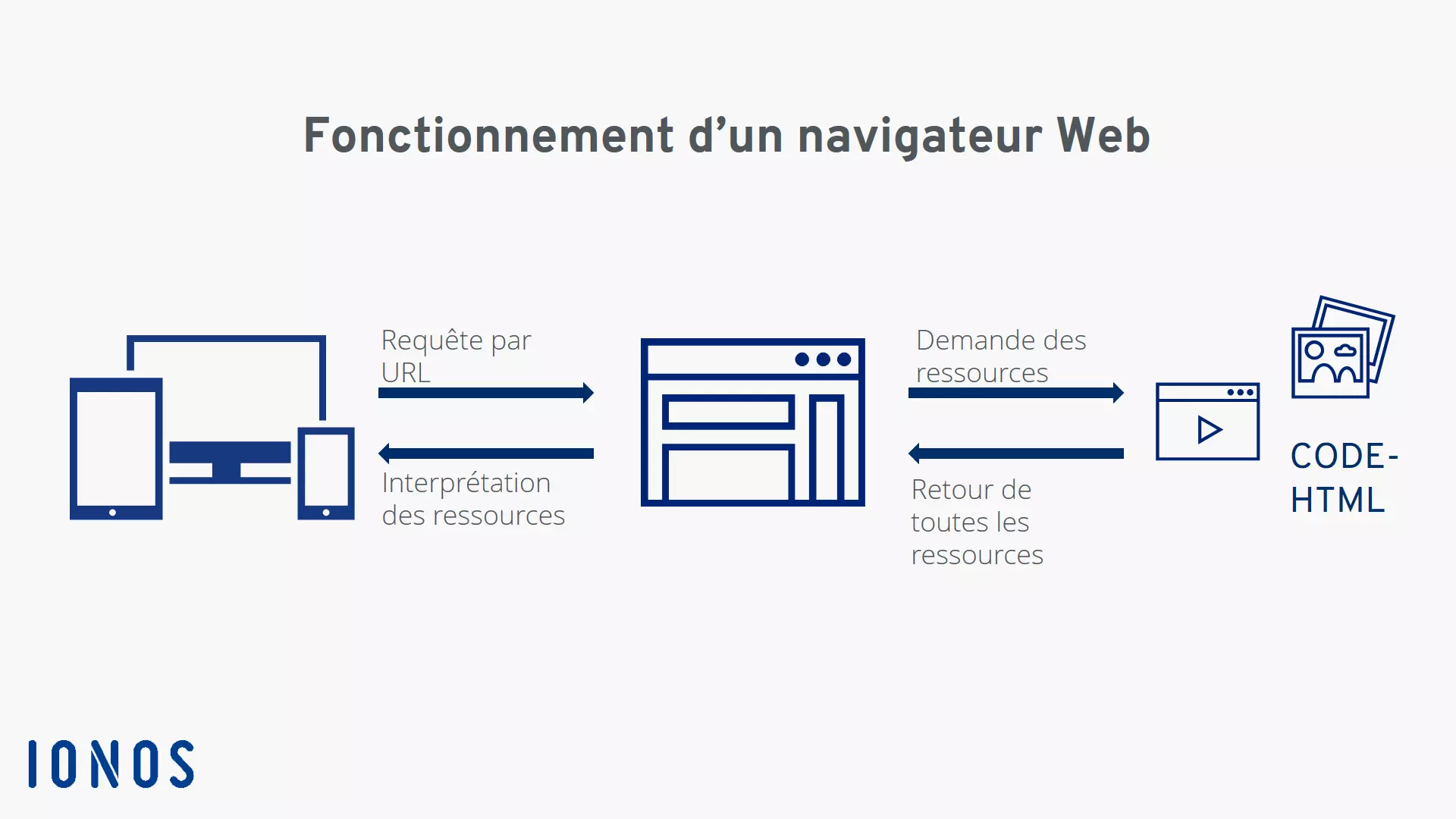
Communication between the device, the web browser and the resources of a website.
But what does this interpretation mean and how does a web browser work technically? To be able to correctly display all resources, the different components perform different tasks: behind what we see, the browser user interface, there is first of all the browser engine, which serves as a link between the user interface and the rendering engine.
The central element of the web browser: the rendering engine
This module is the central component of content presentation : it displays HTML, XML, CSS style sheets and images. Each family of browsers uses its own engine: Blink for Chrome, Edge, Opera and Samsung Internet, WebKit for Safari and Gecko for Firefox. For example, after an HTML file is requested, the rendering engine parses it. This means that the engine parses the HTML data and converts it into a format that the browser can process later. On the one hand, the rendering engine creates the DOM structure, i.e. the structure of the tag content, and on the other hand the rendering structurecolors and other layout criteria.
The two structures are brought together in the following steps: the nodes of the DOM tree structure are first positioned according to exact coordinates. Finally, the rendering structure is processed using the UI backend and allows you to visualize the website: this step is also called “Painting”. “UI” stands for “User Interface”, also called frontend, i.e. what the user ultimately sees on the screen.
Other browser modules
In addition to the UI backend mentioned above, which is responsible for displaying basic widgets such as windows, another module handles the network calls via common protocols such as HTTP. A JavaScript interpreter parses and executes JavaScript code. A data memory is also provided as a persistent component, which stores, for example, cookies, browser history and local cache on the computer. Sites can also store data there, for example with Web Storage and IndexedDB technologies.
Why does a site display differently from one browser to another?
Because browsers use different rendering engines and don’t implement HTML5, CSS, and JavaScript at exactly the same rate, a website in Safari sometimes looks slightly different than in Chrome or Firefox. However, the basic functions are still the same, so you will still see all text, images and links, except that they may be arranged and displayed slightly differently. These differences may also occur if your browser is not up to date. It is therefore recommended to carry out regular updates, which also correct security vulnerabilities. Common browsers update automatically.
What are the browser elements?
After answering the question « What is a web browser? » « , we examine the elements and functions the most important. All browsers come with basic equipment including the following:
- Address bar for entering the URL, which also serves as a search field
- Buttons to navigate forward and backward, refresh or reload, and stop a loading process
- Web browser home page button
- Tabs to open multiple pages in the same window
- Bookmarking feature
Other functions vary from browser to browser or can be added as needed.
What additional functions are useful in a web browser?
Furthermore, browsers like Firefox, Safari or Chrome allow you to organize your bookmarks, save passwords or even use the private browsingwhich Chrome calls “private browsing mode” (“Incognito” in its English version). This means you don’t leave any visible traces on your own device. For example, your browsing history is not recorded and data entered into a form cannot be reconstructed. However, this mode does not make you anonymous: the sites visited, your access provider or your employer can still see your activity. When it comes to security and data protection, popular browsers offer protection against phishing and malware. Safari blocks all third-party cookies by default, and Firefox blocks known trackers while partitioning third-party cookies by site (Total Cookie Protection). Chrome ultimately did not delete third-party cookies: they remain authorized by default and it is up to you to block them in the confidentiality and security settings – except in private browsing, where Chrome automatically blocks them. However, ad blockers are not integrated everywhere: browsers like Brave, Opera or Vivaldi offer one as standard, while Chrome, Firefox, Safari and Edge use extensions. However, these features are not a substitute for comprehensive virus protection, which every device should ultimately have.
Advice
If certain functions are missing, such as the ability to take a screenshot in the browser or display certain content, the range of functions of your browser can be expanded via web extensions. Install them only from the official store of your browser and check the requested permissions.
What web browsers are available and which is the best?
Since all browsers work basically the same, it’s not really possible to say which browser is best. It depends much more on your own requirements and habits. According to Statcounter, here are the most popular browsers in France, all devices combined (October 2026):
| Browser | Editor | Rendering engine | Market share in France |
|---|---|---|---|
| Google Chrome | Blink | 59.61% | |
| Safari | Apple | WebKit | 20.13% |
| Mozilla Firefox | Mozilla | Gecko | 7.16% |
| Microsoft Edge | Microsoft | Blink | 6.42% |
| Samsung Internet | Samsung | Blink | 2.75% |
| Opera | Opera | Blink | 1.99% |
- Google Chrome: on the market since 2008. It is the benchmark for synchronization between devices.
- Safari: Apple’s browser, pre-installed on Macs, iPhones and iPads.
- Mozilla Firefox: Open-source browser developed by Mozilla, with its own Gecko engine.
- Microsoft Edge: the browser shipped with Windows, based on Chromium since 2020. It replaced Internet Explorer, support for which ended in June 2022.
- Samsung Internet: the browser preinstalled on Samsung smartphones.
- Opera: also and especially popular for mobile devices.
More recent browsers like Brave or Vivaldi, also based on Chromium, complete the offer with different approaches, for example enhanced privacy protection.
We provide more detailed information about different browsers in the article “Which is the best web browser?” « .