
The Cloud is today a central component of modern IT infrastructure. This technology makes it possible to use computer resources via the Internet, without having to operate your own infrastructure. To better understand how it works and its advantages, discover in this article the basics of Cloud computing, its main types and its areas of application.
What is the Cloud?
A Cloud uses physical servers located in data centers to provide storage space, computing power and software over the Internet. Both companies and private users can access them encrypted, regardless of location, and adapt the resources flexibly to their needs. Cloud computing thus replaces often rigid local IT infrastructures with a more scalable and efficient solution.
Providing storage and applications in the Cloud, a name derived from the symbolic representation of the invisible IT infrastructure in the form of the cloud, allows significantly greater flexibility. Resources can be scaled up or down as needed, which forms the basis of scalability modern.
Cloud computing has been around for several decades. However, it was only with the rise of the Internet that it became widely accepted. Professional cloud providers today rely on comprehensive security standards, Zero Trust approaches and GDPR-compliant data centers. These developments have greatly reduced initial concerns related to data protection and security.
Computer Engine
The ideal IaaS solution to manage your workloads
-
Cost-effective vCPU and high-performance dedicated cores
-
No commitment for more flexibility
-
24/7 expert support included
What is a Cloud used for?
Cloud services move data, applications and computing processes to servers located outside of the company’s or user’s IT infrastructure. Users can flexibly rent storage space and computing power without having to operate their own hardware. Programs are accessed directly through a browser or apps, which often makes local installations unnecessary.
Overview of important use cases:
- Store, backup and sync files between multiple devices
- Use software directly in the browser (SaaS), without local installation
- Rent computing power flexibly (e.g. for analysis, development or AI workloads)
- Work collaboratively as a team using collaboration tools
- Create and restore backups automatically
- Host websites, online stores or applications
- Operate virtual servers, databases or entire IT environments
Cloud computing plays a central role for collaborative work. Many collaboration tools rely on cloud infrastructures that allow multiple people to access the same data and applications simultaneously.
The Cloud is also used for hosting websites, online stores and applications, as well as operating infrastructure such as virtual servers or databases.
Another important application area of the Cloud is data backup. Backups can be created and restored there automatically. Professional data centers also use redundant storage structures and comprehensive technical and physical security measures to ensure high data availability and permanent access.
The Cloud functions in principle like a corporate network: users connect with their credentials to access data or applications. The difference is that the servers are not located in the company, but in data centers operated by a service provider. In these data centers, IT resources are made available in a virtualized manner. This includes in particular the storage, computing power and RAMwhich are managed by automated administration and security systems. Access to the Cloud is via web interfaces, browsers or specialized applications. Files can thus be managed in a similar way to those on a local hard drive, while programs can be used directly online.
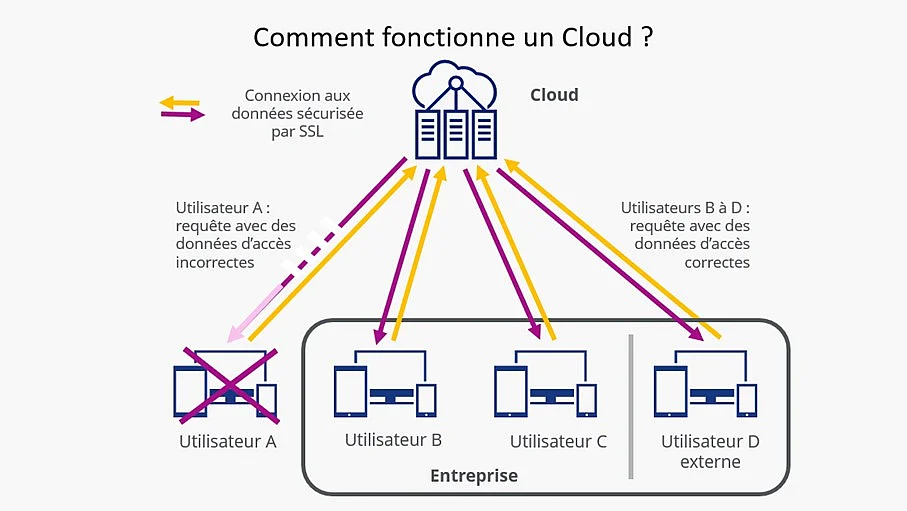
Example of representation of Cloud usage
What are the different types of Cloud?
For businesses to choose the right model for their IT infrastructure, it is important to understand the main types of Cloud. They are mainly distinguished by the entity that exploits the resources, the mode of access and the degree of flexibility or control over the environment. Models range from very secure in-house solutions to scalable services operated by external providers.
Private Cloud
When companies provide their own servers or resources dedicated exclusively to their employees, we speak of a private Cloud. Data and applications are only accessible internally, which is particularly important for sensitive information or information subject to GDPR. Private Clouds offer a level of high controlbut are more complex to exploit and often more expensivebecause maintenance, operation and security remain entirely the responsibility of the company.
Public cloud
A public Cloud is accessible via the Internet and operated by an external service provider. This takes care of the maintenance, security, updates and scalability of the infrastructure. Companies thus benefit from great flexibility and do not have to no need to own their own equipment. Public Cloud services are standardized, quickly available and particularly suited to workloads with rapidly changing needs.
Hybrid Cloud
The Hybrid Cloud combines the two models: critical or particularly sensitive data remains within the company, while other services or workloads are operated in the public Cloud. This model makes it possible to meet the requirements of compliance while enjoying the flexibility and scalability public Cloud services.
Data is stored in a Cloud in a similar way to that on a local hard drive: it can be read, written, modified, moved or deleted. Access, however, is not via a physical drive in the computer, but via web interfaces, applications or synchronization clients which provide an additional Cloud folder.
Regardless of the device used, users can create folders, upload, edit or delete files. Modern cloud services also offer functions such as automatic synchronization, version management, shared folders or even secure storage of complete backups of databases, smartphones or other devices.
Data is encrypted in data centers and stored redundantly, often in distributed object storage. The transfer of data between the terminal and the Cloud is carried out via encrypted connections (TLS). The administration of redundant storage systems, internal data management as well as regular backups are provided by the Cloud provider.
For providers whose servers are located in France or the European Union, the GDPR applies. It imposes strict requirements for data protection, access control, physical security and logging. The stored data thus benefits from a high level of protection, both technically and organizationally, and remains available at all times.
When is the use of a Cloud relevant?
Cloud usage depends on several factors and cannot be determined based on data volume alone. The decisive criterion is the level of flexibility, security and cost-effectiveness desired for the company’s IT infrastructure. In a cost-benefit analysisexpenses related to hardware, maintenance, licensing, personnel and future performance requirements must be compared to the recurring costs of cloud resources.
With cloud services, hardware maintenance, updates, security measures, and modernization are typically included in usage costs. The infrastructure is centrally operated by the provider and automatically kept up to date. Companies therefore no longer have to manage their own servers, secure them or purchase and regularly update local software licenses.
Many providers offer free trial offerings with small storage or testing quotas. Companies can thus outsource their first workloads and gain practical experience before gradually migrating to larger or business-critical areas.
Note
Cloud computing comes with certain requirements: access rights and security policies must be strictly enforced, as multiple people and devices access shared resources. Clear rights management, regular checks and understandable documentation are therefore necessary to meet data protection and compliance requirements.