

Nextcloud Forms is an application for creating, evaluating and managing all forms of online surveys and forms. The application is characterized by a simple design, which emphasizes the central functions and avoids superfluous options. Installation is done via Nextcloud's integrated App Store.
What is Nextcloud Forms?
Nextcloud Forms is an application dedicated to creating, evaluating and managing surveys, questionnaires and forms. It is directly integrated into the Nextcloud Cloud software ecosystem. The application stores, shares and analyzes survey results in the Cloud. Additionally, Forms is easily used in combination with other Nextcloud apps, like Files.
When you use Nextcloud Forms, the data remains on your Cloud server and is not shared with external services. Thus, the private information of respondents is protected and you retain full sovereignty. This is the case for self-hosted instances as well as Managed Nextcloud services. The Forms application thus offers a secure and privacy-friendly solution for all types of surveys and polls, whether it is market research, feedback from target groups or the organization of a company party.
What features does the Forms app have?
With its minimalist and clear design, the Forms app focuses on ease of use. The development team has deliberately avoided unnecessary additional options. In this way it is possible to use Nextcloud Forms without prior technical knowledge nor long training. The clean structure and simple navigation allow you to develop professional surveys, questionnaires and forms in a very short time. Discover the main features of the application below:
- Create secure forms and surveys : whether for creating forms or analyzing the results of a survey, your data is entirely stored on the Cloud server, in order to maintain a high level of data protection and security. To personalize the survey, you can choose from different question types: multiple choice, checkboxes or drop-down lists.
- Share forms : The application offers you various possibilities to share forms with other people, for example via links or via integration on a website. This allows internal teams and external participants to quickly access the created forms. It is also possible to define an access deadline.
- View and export results : the collected responses can be analyzed directly in the application and presented graphically using the tools provided. You can also export form results in CSV format, making further processing and archiving of the data easier.
- Integrate surveys and forms into your own software : The REST API makes it easy to implement Nextcloud Forms within your services, whether it is a content management system or CRM software.
Advice
Are you looking for a secure and convenient Cloud solution that does not require installation, maintenance and updates? With Managed Nextcloud, IONOS takes care of the deployment, regular updates and maintenance of the server infrastructure. With servers located in Germany, you benefit from the highest standards of data protection. Benefit from all the features of Nextcloud from a desktop or mobile device!
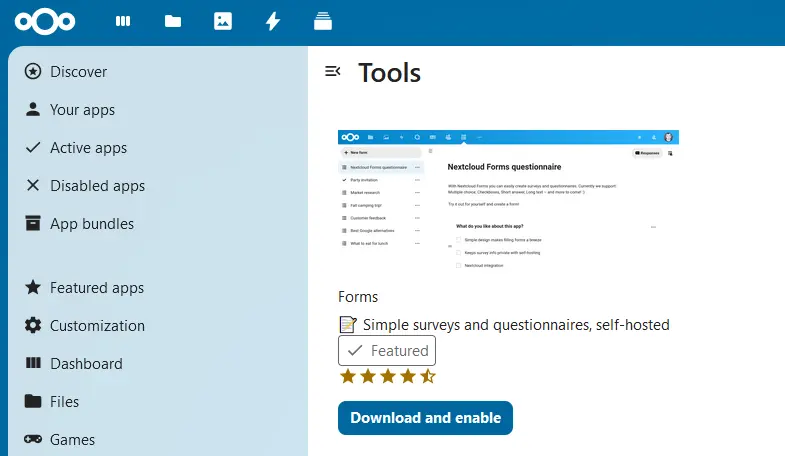
Like most Nextcloud apps, you can add and remove Forms through the software's built-in App Store. The installation of the application takes place as follows:
- Log in to Nextcloud : Log in as administrator.
- Open the Nextcloud App Store : Access the Nextcloud App Store by first clicking on your account icon, then on the “Apps” tab.
- Find the Forms app : Type “Forms” in the search box to find the application.
- Install Nextcloud Forms : by clicking on “Download and activate”, the application is installed automatically.
- Open Nextcloud Forms by clicking on the corresponding icon in the top menu bar.
- Click on “ + New form « .
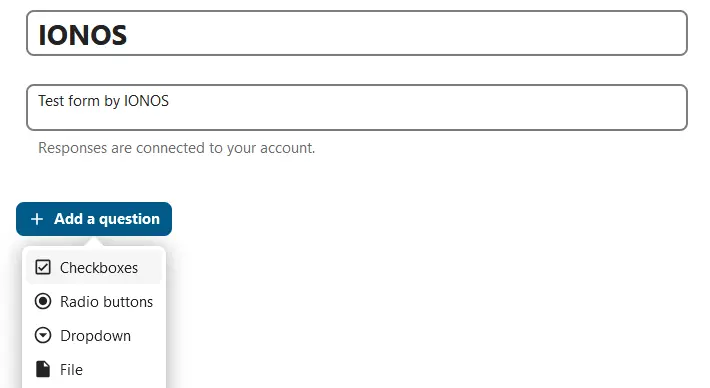
- Set a title for the newly created form and enter a short description.
- Tap “ + Add a question » to open the menu of available response types.
- Select the desired query system and create your custom query.
Managed Nextcloud
Cloud storage that puts you in control
- Effectively protect your data with industry-leading security
- Save time on updates and maintenance
- Easily add apps and collaboration tools
Was this article helpful to you?


