
The complexity of web projects has grown rapidly in recent years. Thus, modern sites are characterized, on the one hand, by a network of HTML, CSS and JavaScript codes complex and, on the other, by the integration of contents (widgets, images, videos, etc.) more and more numerous from other sourcessuch as social networks, streaming platforms or content delivery networks (DCN). If this is not to be done via iFrame, Shadow DOM offers a first-rate alternative solution to integrating this type of third-party content.
In the following article, we explain to you what this consists of sublevel of the Document Object Model (DOM)what other scenarios it is suitable for and how to implement it for your own website.
What does the Shadow DOM cover?
Shadow DOM is a subform of the Document Object Models (DOM) standard and one of the four basic pillars of the Web Components standard developed in 2012 by the W3C consortium. A “ghost” DOM is automatically generated by common browsers from HTML codejust like a regular DOM. However, it does not apply to the entire web project, but only to the component(s) of the project expressed therein. Shadow DOMs distinguish content elements from design and structuring specifications that apply to all projects – such as certain CSS declarations. In short, Shadow DOMs are standalone code capsules possessing a own validity range within an ordinary DOM.
Note
In principle, the designation “template” is inappropriate, both for a DOM and for a Shadow DOM. Strictly speaking, both are interfaces access to data. The base object model only seems important for the validity of these interfaces.
How are Shadow DOMs structured?
Using Shadow DOM is equivalent to having an arbitrary number ofshadow trees in addition to the general document tree summarizing the DOM structure of the entire project. Each tree, the root of which is called shadow rootcontains its own elements and its own style. Trees are always assigned to a specific element of the parent document tree or another Shadow Tree. In both cases they are called shadow hosts. The transition between normal DOM and hidden DOM is called Shadow Boundary.
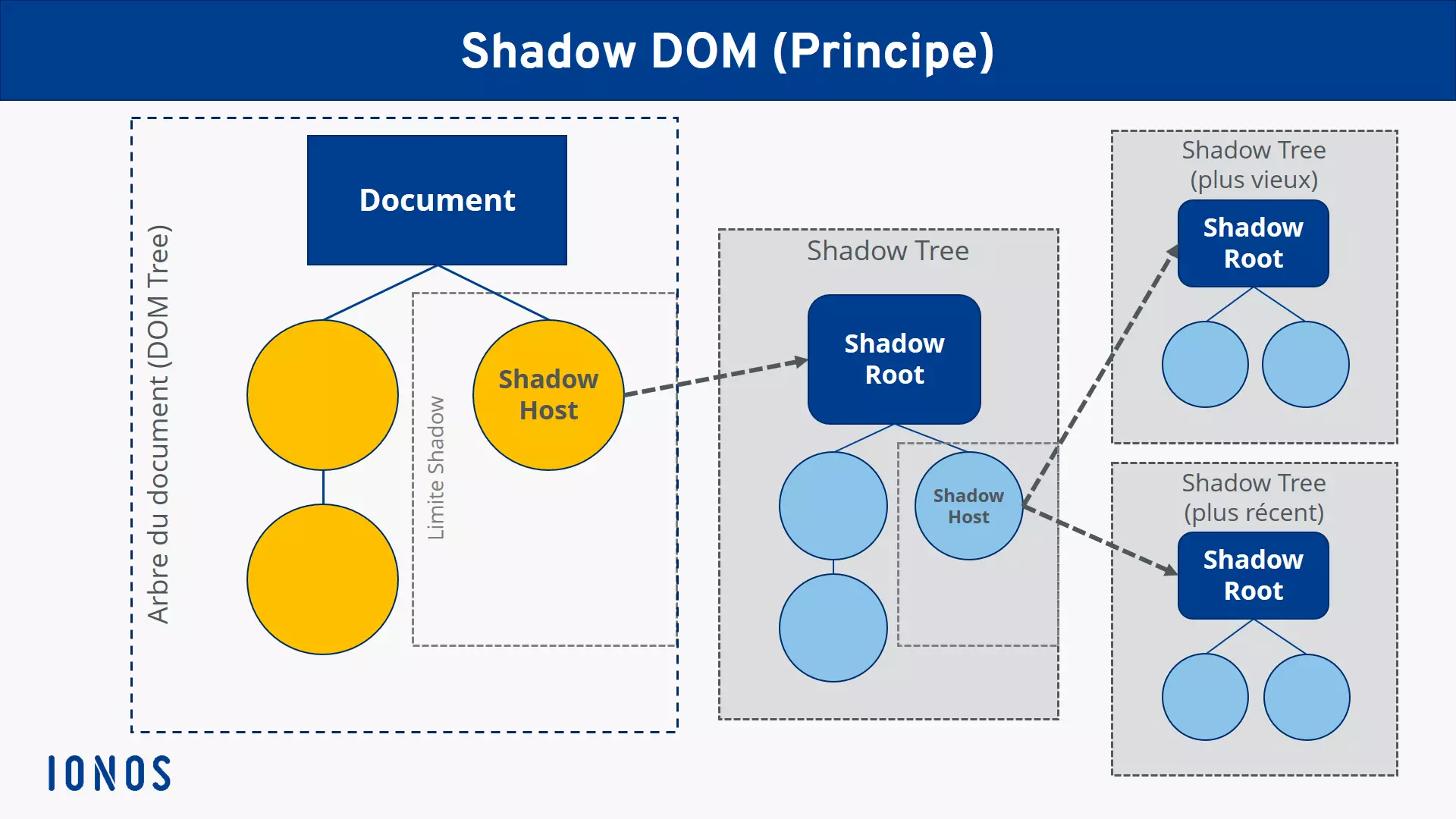
Shadow DOM: schematic representation
How does the use or implementation of Shadow DOM work?
To use the Shadow DOM interface within a web project, it is not necessary to install or integrate any additional software. Since it is technically only a question of create a subtree in the source codeyou can introduce a new Shadow DOM at any time via the HTML document of your web application. Rendering later works with the full top-level DOM, so no additional actions are needed for that either.
The following example illustrates how easy it is to integrate subordinate hidden DOM capsules, by adding to the HTML documentvia a simple JavaScripta Shadow DOM including a element
listing its own style instructions
:
markup
The Shadow DOM implementation script therefore consists of three elements: firstly, the hidden subdocument is generatedhe then receives a simple text element and, finally, the third element is used to manipulate the color of this text (in this case: “red”, that is to say red).
Note
So that a Shadow DOM can be controlled externally via JavaScript using element.shadowRootthe mode must also be set to "open" when calling attachShadow(). If, on the other hand, it is set to "closed", access to the hidden DOM is denied.
For which scenarios is Shadow DOM suitable?
Shadow DOMs give you a great opportunity to separate individual elements of your web project from the rest of your site without the help of special technologies such as iFrames. In addition, they are now fully supported by the most popular browsers, as are all modern web component techniques. So, if you want to design a specific component or area of your website regardless of style instructions and structures of all the documents it contains, hidden DOM is a good choice, easy to implement, especially in complex projects.
However, you cannot not transform all HTML elements as a ghost host. And if you apply this technique to an image file, an error message will be displayed. Concretely, Shadow DOMs are limited to the following HTML components:
- article
- aside
- blockquote
- body
- div
- footer
- h1, h2, h3, h4, h5, h6
- header
- hand
- navigation
- p
- section
- span