

Cronjobs (in French « Cron tasks ») NextCloud are automated processes that perform recurring tasks such as maintenance, synchronizations or notifications. If you want to configure a cronjob in NextCloud, three different methods exist, namely Ajax, Webcron and Cron.
What is the use of NextCloud Cronjobs?
In NextCloud, the Cronjobs are essential for guarantee the efficiency and reliability of the software. They automate the execution of tasks in the background without requiring interaction with the user. Among these tasks, we find in particular:
-
Drain : deleted files are moved to the basket; The old versions of the files are also stored there to allow their catering if necessary. Cronjobs automatically remove these elements after a defined period and thus saves disk space.
-
Regular updates of research indexes : When files are downloaded, modified or deleted, it is necessary to update the NextCloud search indexes. Cronjobs take care of this task at defined intervals so that users always have access to up -to -date search results.
-
Email notifications and activity updates : In NextCloud, Cronjobs are used to inform event users such as downloads in shared files or new calendar entries.
-
Analysis of files in the background : In order to detect the changes made outside the user interface, NextCloud regularly scans the file system. Cronjobs are responsible for this automatically.
-
Maintenance and cleaning : temporary files, old session data and unnecessary database inputs can affect NextCloud performance. Cronjobs carry out cleaning and optimization tasks to ensure the stability and efficiency of the system.
Note
From a technical point of view, a cronjob consists of a script and a command executed via the file cron.php de NextCloud. The different Nextcloud applications automatically register when cron.php performs the corresponding tasks.
Correctly configured cronjobs allowAvoid the accumulation of tasks routine, which leads to a drop in performance and harms the user experience. It is therefore useful, even essential, to create cronjobs in NextCloud.
Managed NextCloud
Cloud storage that gives you control
- Effectively protect your data through advanced security
- Save time on updates and maintenance
- Easily add collaborative applications and tools
Configure cronjobs in NextCloud: the different methods
NextCloud offers Three methods Different to configure and run Cronjobs: Cron, Ajax and Webcron. Each of these options has specific advantages and disadvantages and is suitable for different use cases.
Ajax
Ajax is the default method In NextCloud, but is considered the least reliable option. When a user reaches the NextCloud page, only one task in the background is performed. The main advantage of the Ajax mechanism is that it does not require a specific server configuration or connection to a third -party service. The disadvantage is that the system only executes the cronjobs if the site is visited regularly. Otherwise, some tasks may fail or data may be lost.
Suitable use case : Ajax is recommended for small private user instances.
Webcron
The webcron method is to record the NextCloud script address cron.php with an external service in order to ensure the continual execution of cronjobs. The basic condition is to have the possibility of accessing your server via the Internet. However, the web server generally provides limited resources for the execution of background tasks.
Suitable use case : Webcron is ideal for small instances of five users maximum.
Con
According to the official documentation of NextCloud, Cron is the favorite method of many users because it allows a Reliable and efficient execution processes in the background. Indeed, when you configure Cronjobs in NextCloud via Cron, the CRON function of the operating system is used. The latter allows routine tasks independently of the web server restrictions. However, it requires access to the server and some basic knowledge.
Suitable use case : The use of CRON in NextCloud is particularly recommended in the case of large bodies or production environments.
Note
Consult our « Kubernetes Cronjob » guide to find out how to automate routine tasks in Kubernetes.
Configure Cronjobs in NextCloud (Cron): Instructions
To create Cronjobs using the CRON service, you must have admin duties on the server. The following instructions make it possible to configure cronjobs performing routine tasks every five minutes using the CRON method.
- Open Crontab : Connect to your NextCloud instance and open the Crontab file by performing the following command:
sudo crontab -u www-data -e. - Configure the cronjob : in Crontab, add the command line
*/5* * ** php -f /var/www/nextcloud/cron.php. It ensures the execution ofcron.phpevery five minutes. Replace the path/var/www/nextcloud/cron.phpby the path of your current NextCloud installation. Then save the changes. - Customize the configuration in NextCloud : Go to basic settings (under « administration »). In the « Background Tasks » section (background tasks), select the « Cron » option.
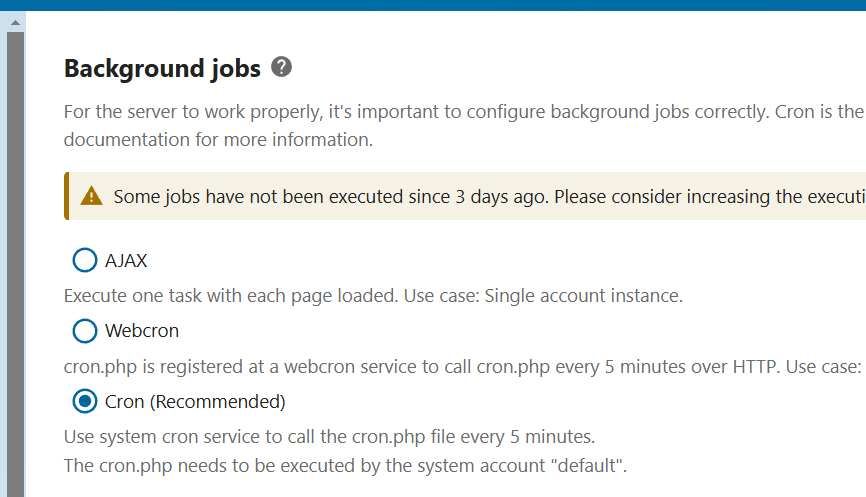
To check if the Cronjob has been added, you can use the command crontab -u www-data -l. If everything worked well, the outlet of the console should look like this:
[snip]
*/5*    **   * php -f /var/www/nextcloud/cron.php
shell
Advice
The Managed NextCloud of Ionos accommodation gives you access to a fully maintained NextCloud instance, which does not require any prior technical knowledge. Ionos takes care of the full administration of the server so that you can focus on your work.
Creation of Cronjobs via systemd
If Systemd is installed on your system, you have the possibility of managing Cronjobs in NextCloud via this session and maintenance manager. It provides timers for planned tasks and more precise control of task planning. Finally, Systemd is perfectly suited to the environments on the server side.
Dedicated servers
Performance and innovation
Take advantage of your own server, with dedicated hardware, cloud integration, minute invoicing and Intel® Xeon® or AMD processor.


