AI Overviews are Google-generated summaries that appear above search results. It is not possible to disable AI directly. However, with suitable browser settings or by switching to other search engines, you can specifically bypass these AI-generated responses.
Summary
AI Overviews are automatically generated summaries in Google Search that cannot be deactivated directly, but can be circumvented in a targeted manner.
- The “Web” tab below the search box hides the AI-generated short answer.
- The parameter
udm=14in the URL, or the browser settings, allow direct access to Web mode. - Alternatives like Mojeek, MetaGer or Startpage allow classic search without generative answers.
What are Google AI Overviews?
Since May 2024, Google has been displaying so-called AI-generated summaries in search results in the United States. Since March 2025, they have also been visible to many users in several European countries; in France, deployment remains more gradual due to ongoing regulatory discussions with press publishers. At the very top, above the ranked search results, appears a AI-generated short answeroften in summary form with a few key points. Below, Google provides links to sources for you to verify the information.
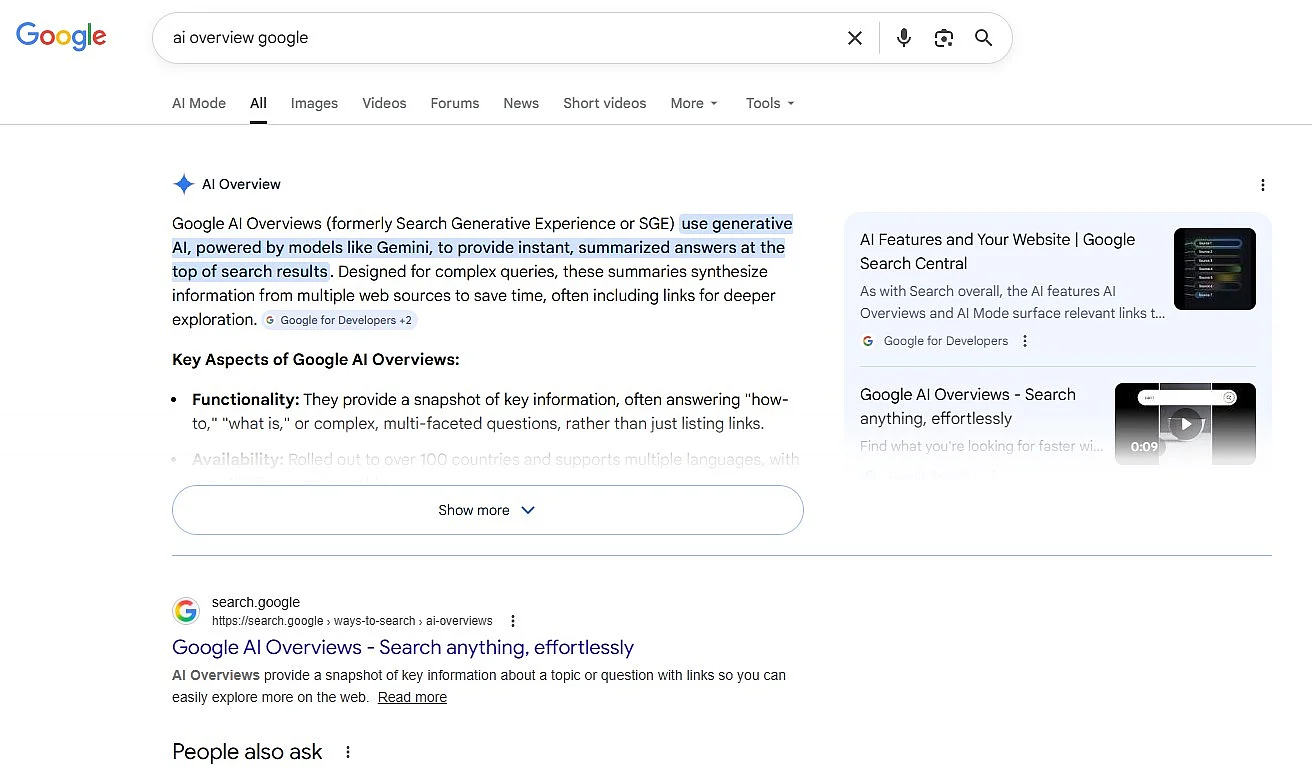
AI Overviews: The AI-generated section directly below a Google search query. / Source: https://www.google.com/
Google Search without AI: is it still possible?
Opinions on AI Overviews are divided. From an SEO and website operator perspective, many people are bothered by this feature because it diverts potential visitors from their own website and can harm search engine marketing. On the user side, some find it practical to receive an answer to their questions directly, without having to click through websites. Others prefer to do their own research or don’t trust automatic responses.
There is currently (as of February 2026) no specific option to directly disable AI in search results. However, there are several solutions to circumvent these AI-generated summaries:
- Use the “Web” filter: In the tab just below the search box, you can click « Web » after your query, which hides the AI Overview. Sometimes the « Web » tab is under « More. »
- Adapt the search: by adding
-aiat your request, you can bypass the AI display, but this may disrupt the search. - Search via URL: if you launch your search from the URL bar, you can go directly to web mode with the parameter
udm=14. The URL then becomes:https://www.google.com/search?udm=14&q=terme
It is also possible to define the parameter udm=14 by default, but this is not possible directly in Google. Here’s how to do it in Google Chrome:
- Open it three point menu at the top right of the browser and select “ Settings « .
- Go to the left sidebar and click « Search Engine », then » Manage search engines and site search « .
- In the section “ Site Search », click on “Add”.
- Enter the following link in the field:
https://www.google.com/search?q=%s&udm=14 - Name it and set a shortcut.
- Save and set it as your default search engine.
The procedure is similar in Firefox. For Safari, additional extensions are required.


What are the alternatives to Google without AI?
Many search engines currently incorporate AI functions. However, there are many alternatives to Google today. Here are some options that, as of now (February 2026), still work without AI.
DuckDuckGo
DuckDuckGo offers AI features, but they remain optional and can be disabled in settings. Additionally, there are search variants without AI answers. In the standard view, links remain in the foreground. DuckDuckGo is particularly suitable for those who want a modern interfacewhile choosing for themselves if and when AI should be used.
Mojeek
Mojeek is defined as a classic search enginewithout automatically generated responses. It uses its own search index and provides an experience without AI intervention. The results are presented as a list of classic links, without automatically generated summaries. Mojeek does not rely on Google or Bing, which sometimes generates different but more independent results. Additional boxes, such as infoboxes, can be minimized or completely disabled in the settings. Mojeek is perfect for those who want to specifically search for websites, with a presentation as close to the originality of the web as possible, without the intervention of AI.
MetaGer
MetaGer is a metasearch engine that combines several sources. It emphasizes the data protection and accessibilityand favors classic results without AI-generated summaries, but with external links. MetaGer is an interesting European alternative for those who want to do without AI-generated summaries. Although its interface is a little more technical, the search remains faithful to the original idea of the Web.
Startpage
Startpage offers search results from Google, but without transmitting personal data to Google. It favors links to websites rather than automatically generated responses, with a classic presentation without automatic responses. Its interface is clean and strongly reminiscent of the old version of Google. Although there are a few infoboxes, the search remains classic. For many, Startpage represents a good compromise between familiar results and reduced use of AI.
SearXNG
SearXNG is a open source metasearch engine that combines results from several engines. By default, it displays a simple list of links without AI-generated summaries. It is ideal for those who want full control over their searches, which is why it is often self-hosted or used through public instances. The interface, sources and additional features can be adjusted with great precision. By default, SearXNG displays a simple list of links, without AI-generated summaries. SearXNG is an ideal alternative for technical users who want to maintain maximum control over their searches.
rankingCoach
Boost your sales with AI digital marketing
-
Improve your ranking on Google without the expense of an agency
-
Respond to customer reviews and generate posts for networks
-
No SEO and online marketing knowledge required
In summary
Today, there is no such thing as a completely AI-free Google. AI Overviews are now an integral part of search and cannot be disabled directly. However, it is possible to find a search experience closer to classic mode. The web filter or direct access via web mode allows you to display a list of results composed mainly of links, relegating the AI-generated summaries to the background.
For those who want to systematically search without AI-generated answers, there are alternatives. Search engines like Mojeek, MetaGer or SearXNG always favor redirection to websites, rather than offering pre-formulated answers.