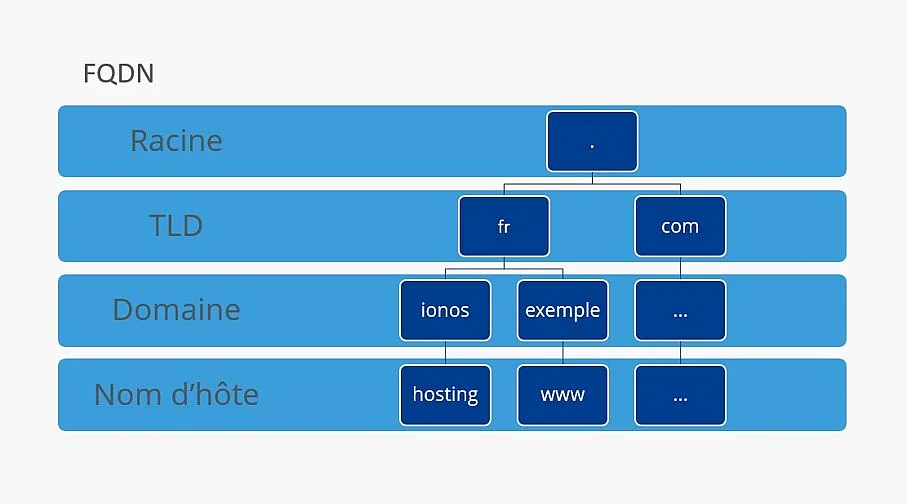
The term “Fully Qualified Domain Name”, abbreviated as FQDN, refers to the fully qualified and unique domain name of a host on a network. It consists of the host name and the fully qualified domain name and allows a server or other device on the Internet to be precisely identified through name resolution.
What is an FQDN?
FQDN means Fully Qualified Domain Namein French “fully qualified domain name” or “full domain name”. An FQDN is the full and unique name of a host on a network. The term “fully qualified” means that all levels necessary for its identification are indicated.
An FQDN consists of the host name and the fully qualified domain name, including the top-level domain (TLD). Using the DNS system, an FQDN can be resolved to one or more IP addresses.
A Fully Qualified Domain Name is made up of several labels organized according to the DNS hierarchy. It may include a host name, one or more subdomains, a domain name, and a top-level domain. In its strictly complete notation, the FQDN also ends with the root label, represented by a full stop. So, www.exemple.com. constitutes the fully qualified form of the noun, although the final period is usually omitted in common usage.
When a name does not contain all the information necessary to be interpreted from the DNS root, it is called Partially Qualified Domain Name (PQDN)or partially qualified domain name. It can be, for example, a simple host name whose domain must be completed depending on the network context.
To better understand the hierarchy of an FQDN, it is helpful to read it from right to left. The further right a label is, the higher its level in the DNS tree:
- Root Label: At the top of the hierarchy is the root of the Domain Name System (DNS). It corresponds to an empty label and is represented, in the full notation, by the point located at the end of the FQDN. This point is generally omitted in addresses entered on a daily basis.
- Top Level Domain (TLD): just below the root is the top level domain, e.g.
.fr,.comOr.net. - Domain name: at the next level is the name registered under the TLD, e.g.
exempleInexemple.com. - Subdomains and hostname: additional labels may precede the domain name. In
www.exemple.comFor example,wwwdesignates the host or subdomain in question.
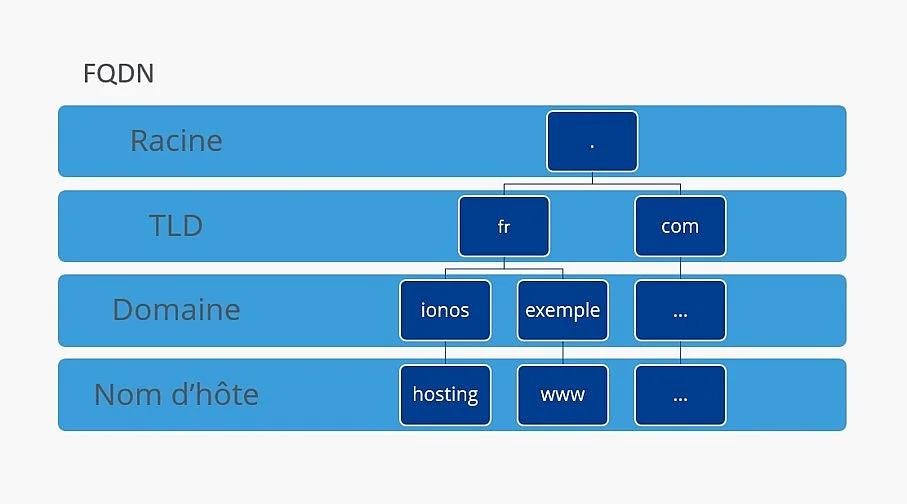
The structure of a Fully Qualified Domain Name (FQDN) reflects the hierarchy of the DNS system and the different components that uniquely identify a host.
Note
The different levels of a domain name are called “labels” and are separated by periods. In DNS, each label can contain up to 63 bytes and the complete representation of a domain name is limited to 255 bytesincluding length information and root label. For typical host names, letters, numbers, and hyphens are typically used. Internationalized domain names containing other characters are converted to a DNS-compatible representation.
Under Windows 11you can find the computer name and domain information through the system settings. Open “ Settings > System > Information « . In the “Device specifications” section, the “ Device name » indicates the computer name. To find out if it belongs to a domain, then open the link relating to the domain or working group in the associated settings. If the computer is joined to a domain, you can reconstruct its FQDN from the device name and the domain.
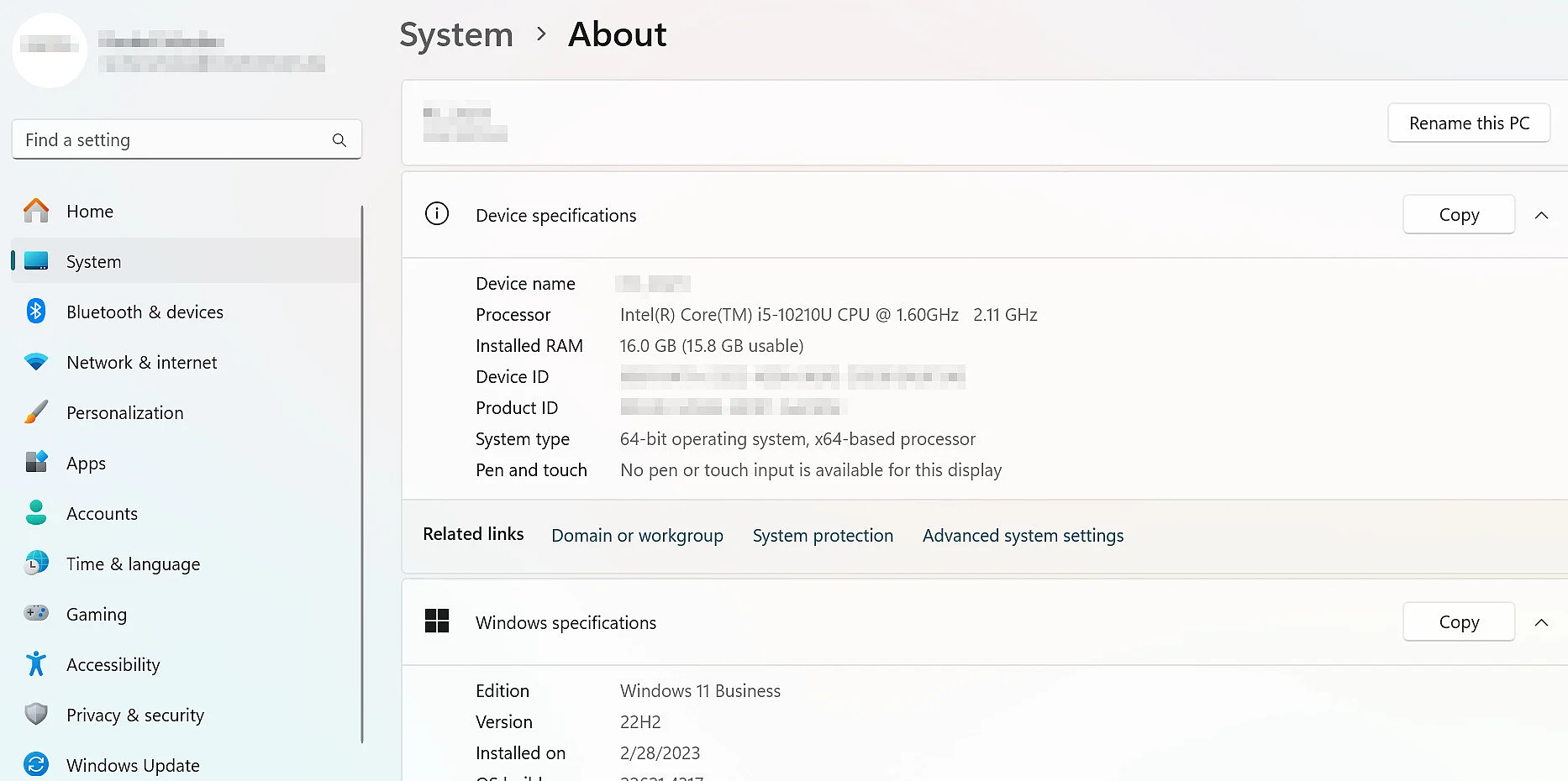
Windows System Information allows you to view the computer name and domain data.
Under Windows 10the procedure is similar. You can open the “ Control Panel ”, then select “ System and security > System « . The information displayed includes the name of the computer and the domain or workgroup to which it belongs.
Note
Windows 10 mainstream support ended on October 14, 2025. Microsoft recommends upgrading to Windows 11 when hardware is compatible. However, some devices may still receive limited security updates through the Extended Security Updates (ESU) program. Windows 7 has long been out of support and should only be used in specific, isolated legacy environments.
You can also display the FQDN on Windows via Command Prompt (cmd.exe). To do this, enter the following command, then press Enter:
echo %COMPUTERNAME%.%USERDNSDOMAIN%bash
You then obtain the display of your FQDN. If the computer and user account are associated with a DNS domain, the command combines the computer name and the domain to form the FQDN.
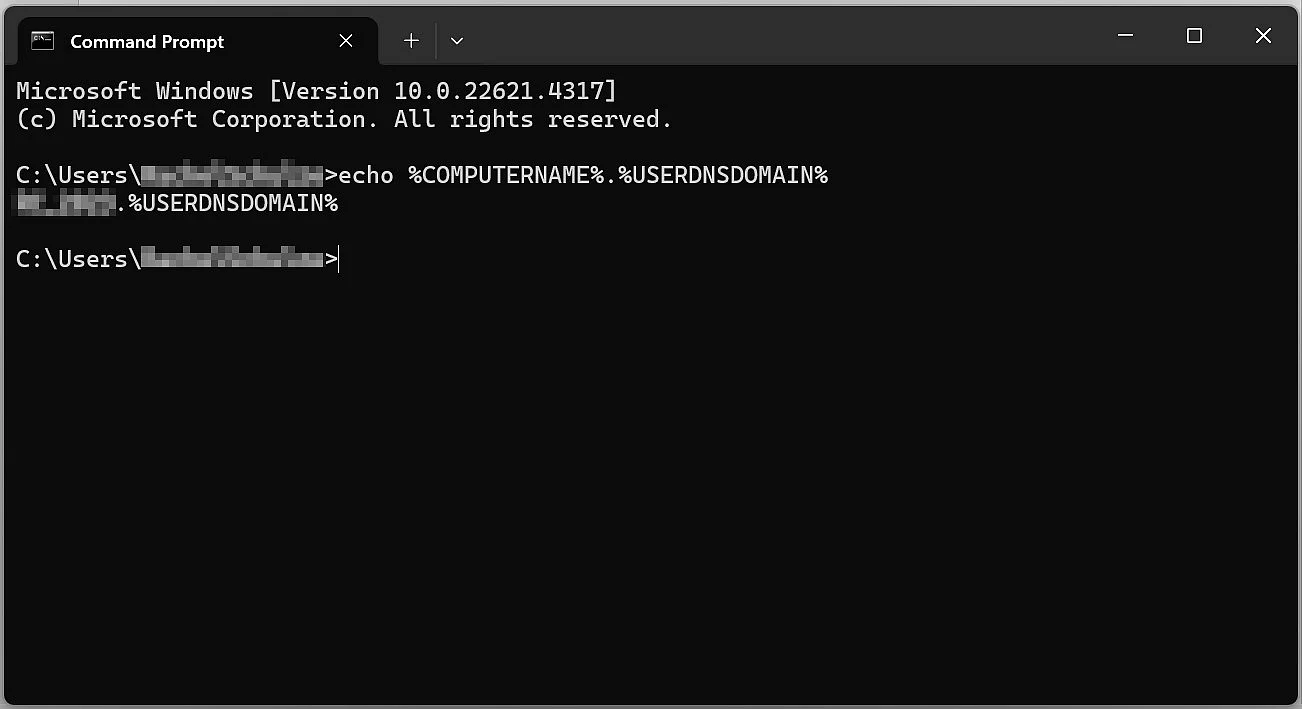
The FQDN can be viewed on Windows using the command line.
If your Mac’s hostname and DNS resolution are configured correctly, you can check the full device name in Terminal.


Below Linuxenter the command already mentioned in macOS into the terminal.
You can also use the following command:
After having pressed the Enter keythe FQDN is displayed. If you are not joined to a domain, only the host name is displayed.
The following example illustrates the structure of a Fully Qualified Domain Name (FQDN):
Example : www.ionos.fr.
- Hostname:
www - Domain name:
ionos - TLD (top-level domain):
.fr - DNS root: the end point (
.), which represents the root label in the full FQDN notation
In common usage, this endpoint is usually omitted. The FQDN therefore appears most often in the form www.ionos.fr.
How do subdomains fit into an FQDN?
Between the domain name and the hostnameit is possible to add one or more subdomains. They make it possible to structure different zones or services of a domain, for example shop, blog Or support.
Example : hosting.exemple.ionos.fr.
frcorresponds to the top-level domain.ionoscorresponds to the domain name.exempleis a subdomain ofionos.fr.hostinghere denotes the host name.
Multiple levels of subdomains can be added. Their number is not fixed in advance, but the total length of the DNS name remains limited by the DNS specifications.
In summary: why is FQDN essential to the functioning of the Internet?
A Fully Qualified Domain Name is an essential part of the Internet because it accurately identifies a host and ensures reliable name resolution. The structure of the FQDN, composed in particular of host name, domain name, and top-level domainallows DNS to resolve a readable name to the corresponding network information.
If you want to know the FQDN of your computer or check that of a server, you can easily find it under Windows, macOS Or Linux using the methods described above. Understanding how an FQDN works allows you to better understand how devices and services are identified and accessible on a network.