The Twitch ID under which users find your channel can be changed in a few steps in the profile settings. Keep in mind, however, that if you change this username on Twitch, your channel URL will also change. Our step-by-step guide shows you how to change your Twitch ID and nickname.
Summary
You can change your Twitch ID, and therefore your channel URL, both on PC and in the mobile application, from the profile settings.
- In the app, tap your profile picture, then tap « Edit Profile » to change the username or nickname.
- On computer, open Settings, go to the “Profile” tab and click the pencil icon.
- Changing your identifier is only possible every 60 days; the old name remains blocked for six months.
- Update all your links after the change, as the channel URL is changed.
On mobile:
- In the Twitch app, tap your profile picture at the bottom right, then tap “ Edit profile « .
- You can then change your username (which also modifies the channel URL) or only the nickname.
On computer:
- Go to the Twitch website, click on your profile picture at the top right, then click on settings.
- In the “ Profile « , click the pencil icon next to » Identifier » to change your username on Twitch, or edit the pseudo just below without changing the URL.
Please note: Changing your Twitch ID is only possible every 60 days and depends on the availability of the chosen name.
If you want to become a Twitch streamer and grow your channel with Twitch tutorials or gaming streams, choosing a memorable name is essential. If your current nickname no longer matches your content, you can easily change your nickname and ID on Twitch, whether on mobile or desktop.
Change Twitch nickname on the mobile app
Step 1: open the Twitch app on your smartphone and log in.
Step 2: tap at the bottom right on your profile photo to access the menu.
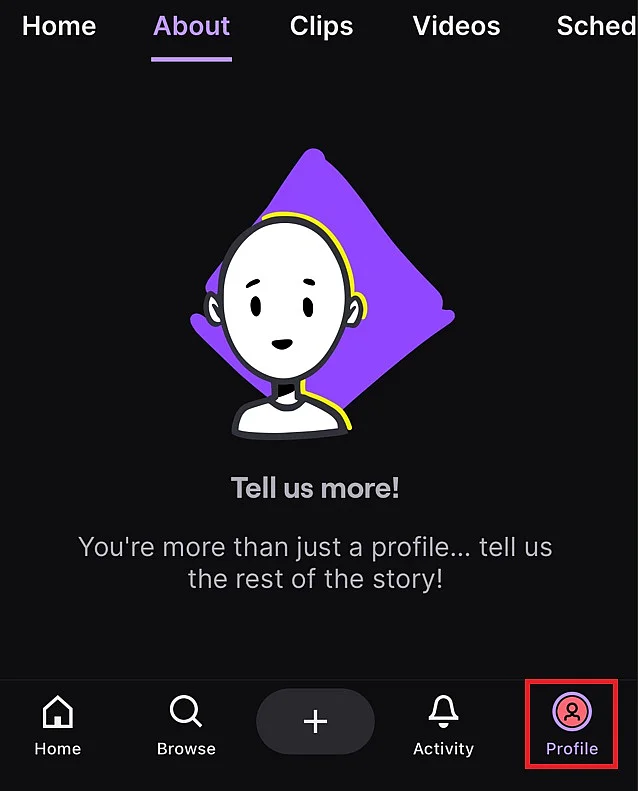
The menu is accessible via the profile photo.
Step 3: press at the top right on “ Edit profile « .
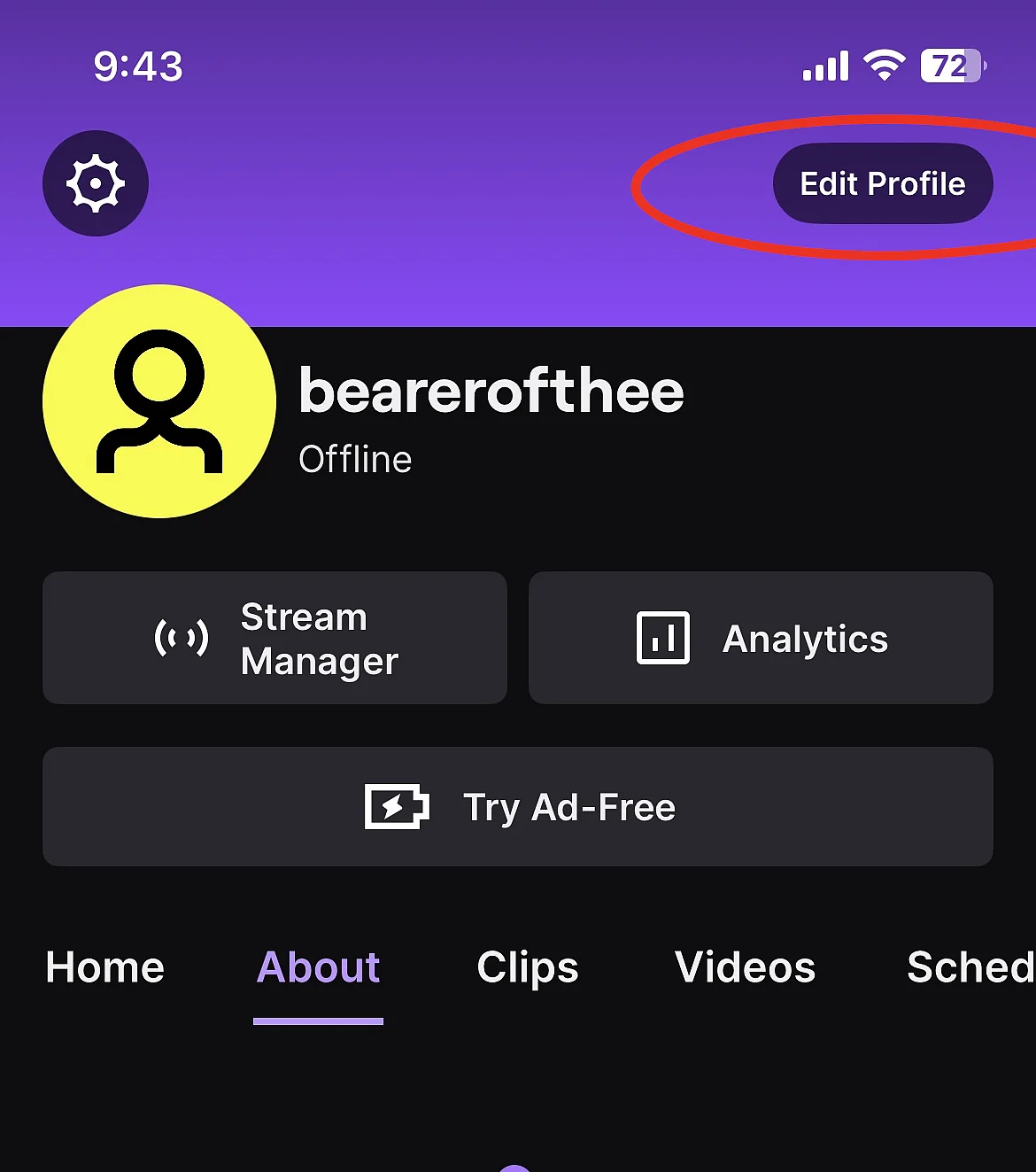
Channel settings are in the menu.
Step 4: you can then modify your identifier (which also changes the URL of the channel) or only the nickname displayedwithout impact on the URL.
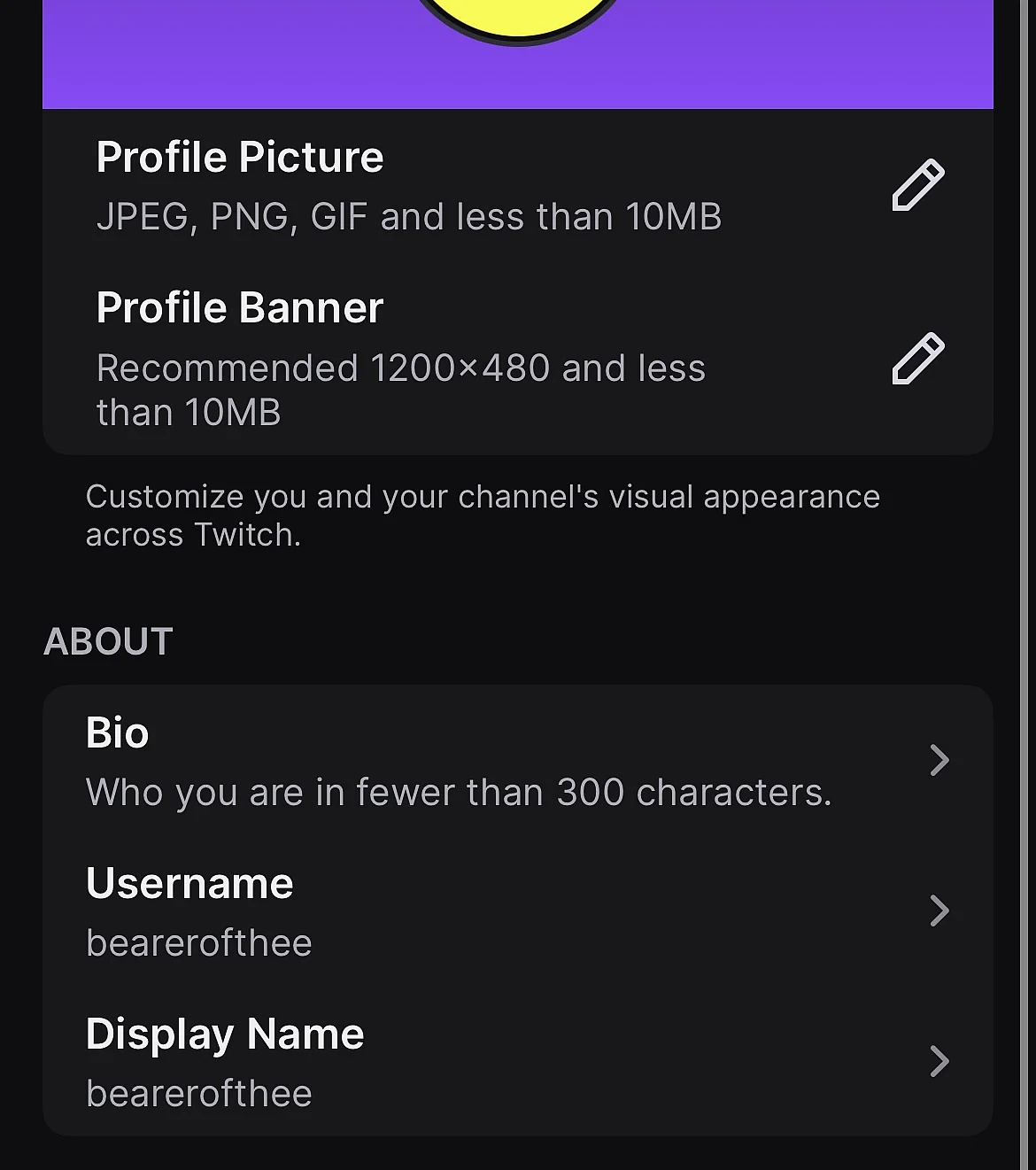
The “Edit Profile” menu in the Twitch mobile app.
Domain transfer
Easily transfer your domain name
-
No downtime, your site remains available
-
1 Wildcard SSL certificate per contract
-
No transfer fees and exclusive offers
Change Twitch nickname on computer
Step 1: connect to Twitchclick on your profile picture at the top right and select settings.
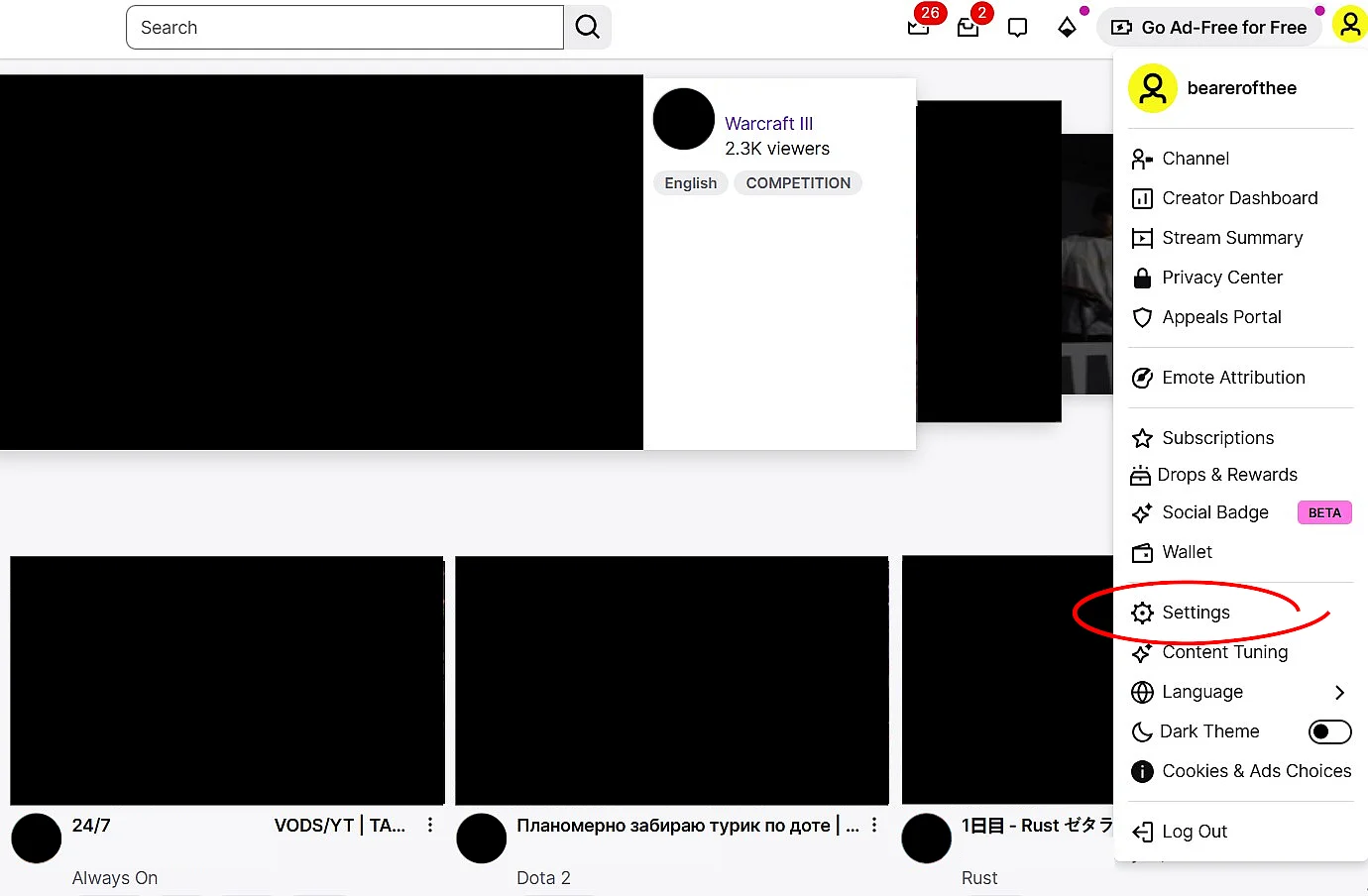
The channel settings can be found in the menu that unfolds via the profile photo.
Step 2: you will find the profile settings in the “ Profile « . This should also already be open by default. This is where you can change the username as well as the channel URL under “ Identifier « . If you only want to adjust details like the upper and lower case of the current name, go to “Nickname”.
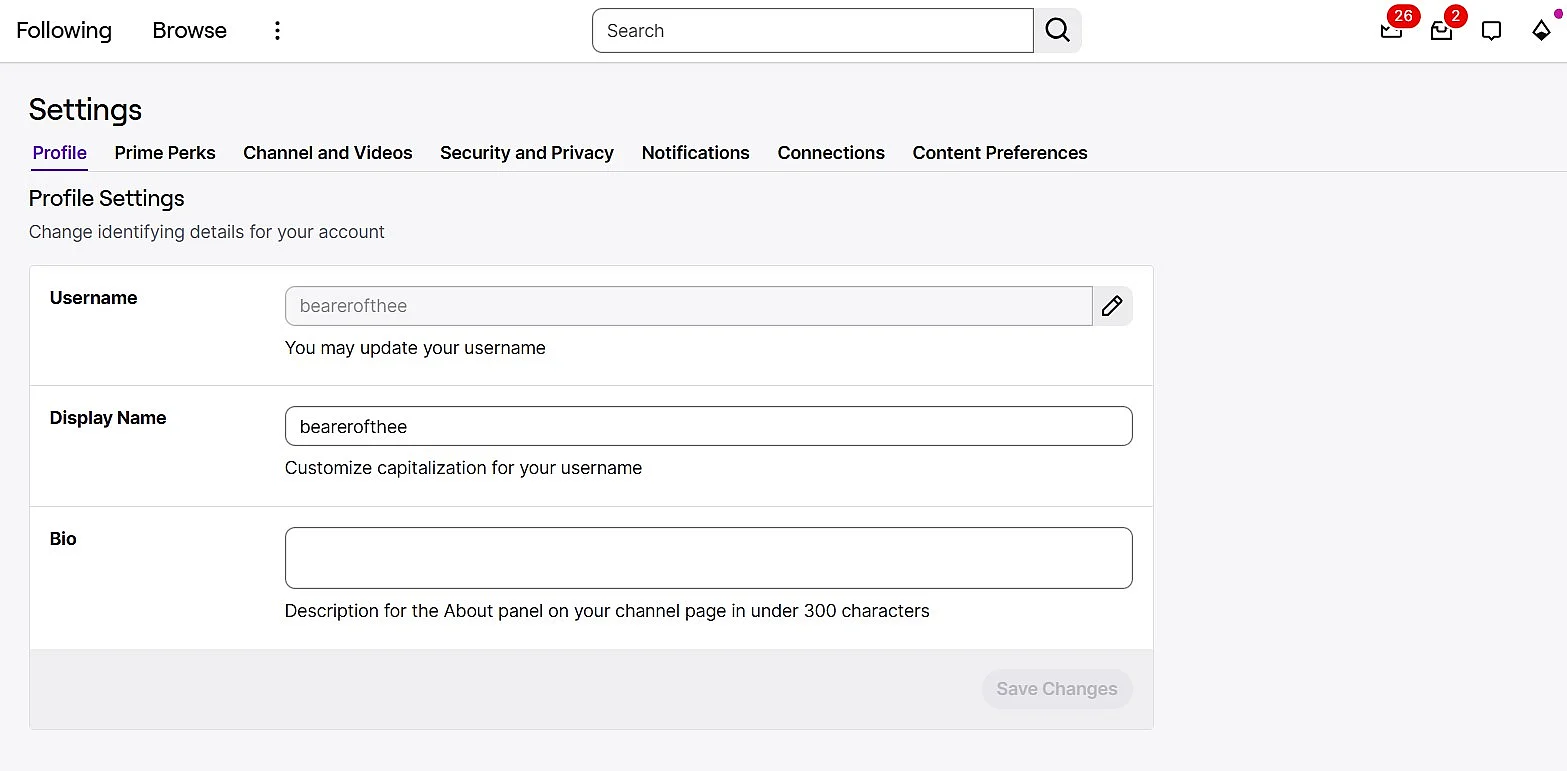
In the “Profile” tab there are settings for username and display name.
Step 3: enter your new username in the name edit menu, then commit the changes.


What rules should you know before changing your identifier and nickname on Twitch?
You can change your login on Twitch only every 60 days. So take the time to choose a suitable username, as you will have to wait around two months before you can change it again.
Your old Twitch ID remains blocked for six months before it can be used again, whether by you or another user. To collect it, you will have to be the first to claim it once this time has passed.
On the other hand, a simple modification of upper and lower case via the “ Pseudo » is not considered a change of identifier and is possible at any time.
For Twitch partners, an exception applies: their ID is generally not made available to the public after six months. However, they can contact Twitch support to request a manual recycling of their name.
Note
Changing your Twitch ID is the same as changing your channel URL. Consider letting your followers know and updating links to your Twitch channel on your other web pages. Additionally, some statistics may be lost when changing, so it is recommended to export them first.
Is the Twitch platform secure?
Twitch has long offered two-factor authentication (2FA). This security measure protects your account by requiring, when logging in, a verification code in addition to your password. You receive this code on your smartphone by SMS or via an authentication application like Authy. For streamers, activation is mandatory, otherwise it is not possible to start streams.
You can enable 2FA on Twitch in the following ways:
- Open them Twitch settings.
- Go to the “ Security and Privacy « .
- Click on “ Enable two-factor authentication » and follow the instructions.
Once enabled, each login attempt from an unknown device or location must be validated by an additional step. This prevents unauthorized access, even if your password is compromised.
Note
If you change your phone or number, you can update the information used for 2FA in the same menu. Twitch also offers additional email verification for new connections, to detect and block suspicious activity more quickly.