
Keywords are essential, both for search engine advertising (SEA) and for natural referencing (SEO). To gain visibility and reach your audience at the right time, you need to identify the terms they are searching for. Google Keyword Planner helps you define your strategy with data on search volumes, competition and performance forecasts.
Summary
Google Keyword Planner is a free tool for SEO keyword research and preparing Google Ads campaigns.
- Find new keywords and view search volumes and trends
- Refine results by region, language, network or time period
- Create forecasts for clicks, costs and conversions
- Use data directly from Google
What is Google Keyword Planner?
Google Keyword Planner is a free tool from Google, initially designed to help advertisers prepare their Google Ads (formerly AdWords) campaigns. It is also a useful resource for SEO keyword research. It allows you to create keyword lists and analyze search volumes, competition and trends to guide your SEO and SEA strategies.
The main features of the tool:
- Find new keywords
- View search volumes and trends
- Create keyword combinations
- Establish click and cost forecasts
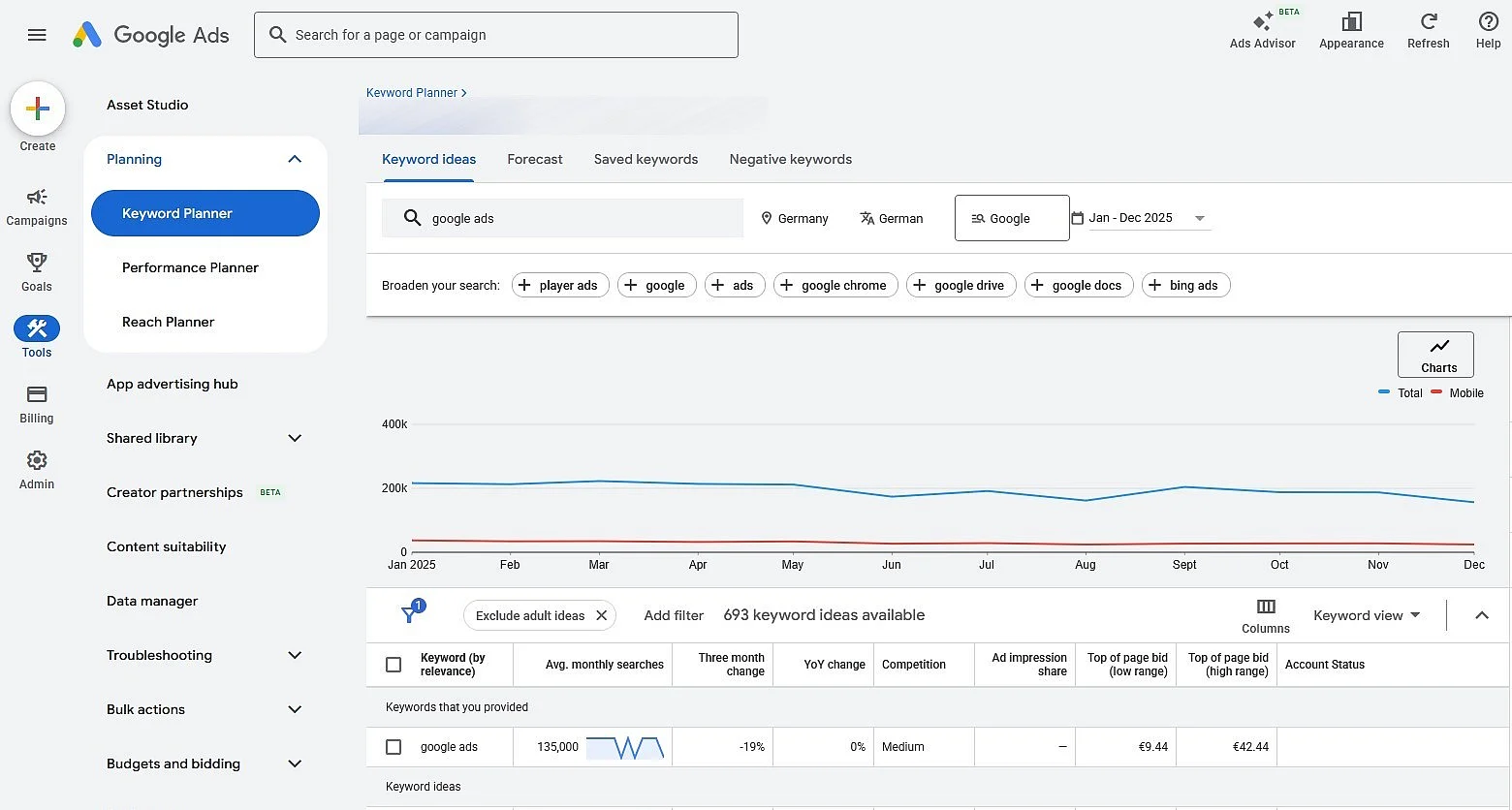
Google Ads allows you to display search volumes for different keywords.
To research new keywords, you need a Google Ads account in Expert mode. No active campaign or ad spend is required, but you must complete account setup with your billing information to access basic features.
Log in to your Google Ads accountopen the “Tools” menu and select “Keyword Planner”. Then choose “Get search volume and forecasts” to analyze an existing list or “Find new keywords” to start a new search.
You can :
- Enter multiple terms or a website address
- Define your region or city
- Define the language
- Choose between Google Search and Google with its Search Network partners
- Define a period
- Refine the results using filters (search volume, competition, bidding range, etc.)
Click “Get Results” to see keyword suggestions, search volumes, competition levels, and trends. Volumes are estimates: for accounts without active ad spend, Google displays wide ranges (e.g. 1,000 to 10,000), and volumes group close variations of a keyword (singular/plural, typos). Some very under-searched or sensitive keywords are not available.
You can export results to CSV formatadd them to a keyword plan, or use them to build campaign forecasts.
rankingCoach
Boost your sales with AI digital marketing
-
Improve your ranking on Google without the expense of an agency
-
Respond to customer reviews and generate posts for networks
-
No SEO and online marketing knowledge required
What are the benefits of Google Keyword Planner for SEO?
Google Keyword Planner allows you to evaluate the search volume for each keyword. The “Competition” column measures the intensity of advertisers’ bidding: it does not reflect the difficulty of positioning yourself in natural referencing. For SEO, it has several advantages:
- Analysis of search trends: Seasonal query trends and variations help you adapt your strategy throughout the year.
- Creating keyword lists: You can save or download keyword suggestions and then incorporate them into your content strategy or campaigns.
- Targeted keyword analysis: Geographic and device breakdowns allow you to identify the keywords most relevant to your audience and tailor your strategy to their needs.
Note
Even with the rise of AI-powered search systems, AI Overviews, and auto-generated answers, keywords remain essential. Search engines understand the meaning and context of content better and better, but Internet users’ queries remain at the heart of visibility. The focus thus shifts from single keywords to search intent, topic groups and semantic links. Keyword Planner, however, reflects the demand on Google Search and, depending on the selected parameters, on its search partners and does not cover queries sent to AI assistants.
What data does Google Keyword Planner provide?
Google Keyword Planner allows you to find new keywords with “Find new keywords” and analyze an existing list with “Get search volume and forecasts”, as well as view statistics and forecasts for search engine marketing. Its main advantage compared to other tools is to rely on the Google datawhich directly reflect the searches carried out on its engine. The table below presents the main indicators available:
| Value | Description |
|---|---|
| Average number of monthly searches | Average number of monthly searches for the keyword over the selected period (rounded values) |
| Competition | Level of competition between advertisers bidding on this keyword, from “low” to “high” |
| Top of page bid (low/high range) | Historical bidding ranges for ads served at the top of the page. |
| Search trend | Seasonal evolution of searches over time |
The Keyword Planner tool also allows you to estimate the performance of your Google Ads campaigns. When preparing a campaign, it provides forecasts of clicks, costs and impressions, as well as the following indicators:
| Indicator | Description |
|---|---|
| Clicks | Estimated number of plan clicks for the selected period. |
| Prints | Estimated number of views of your ad |
| Costs | Estimated cost of the plan for the selected period. |
| CTR (click-through rate) | Proportion of impressions that generated a click, useful for evaluating the effectiveness of the ad |
| Average CPC (cost per click) | Estimated average cost of a click |
| Conversions | Estimated number of conversions for the actions included in the forecast. |
These indicators help you to evaluate the performance of your Google Ads campaigns and optimize your budget.
What other data can I view in Google Keyword Planner?
In addition to the monthly search volume trends graph, multiple analysis views allow you to evaluate the potential of a keyword:
- Breakdown by device: see the share of average monthly searches carried out on tablet, smartphone or computer for a given keyword.
- Geographic distribution: visualize search volumes by country, region or city, especially to prepare local or international campaigns.
- Plan Forecast and Performance Overview: Estimate clicks, impressions, costs and conversions based on your bidding strategy to evaluate possible campaign results.