

When you call an IP address, you are usually trying to contact another computer on the Internet. However, if you call the IP address 127.0.0.1, you are basically communicating with your own computer via localhost. But what's the point of starting a virtual conversation with yourself? Why do you need localhost and how does it work?
Domain name
Your domain in one click
- 1 Wildcard SSL certificate per contract
- Included Domain Connect feature for simplified DNS setup
What is a localhost?
To explain what localhost is, we must first understand thatit points to your own computer : when you call localhost, your machine communicates with itself. However, this vision remains simplified. The localhost is not directly associated with your typical IP address, but uses a specific address reserved for loopback, such as 127.0.0.1, different from the address assigned by your Internet service provider. In a home network, your device may also have an internal address such as 192.168.0.1. When you talk about a localhost, you are referring to a server running on your own computer, accessible through localhost or http://localhostand associated with a localhost address dedicated to testing and development.
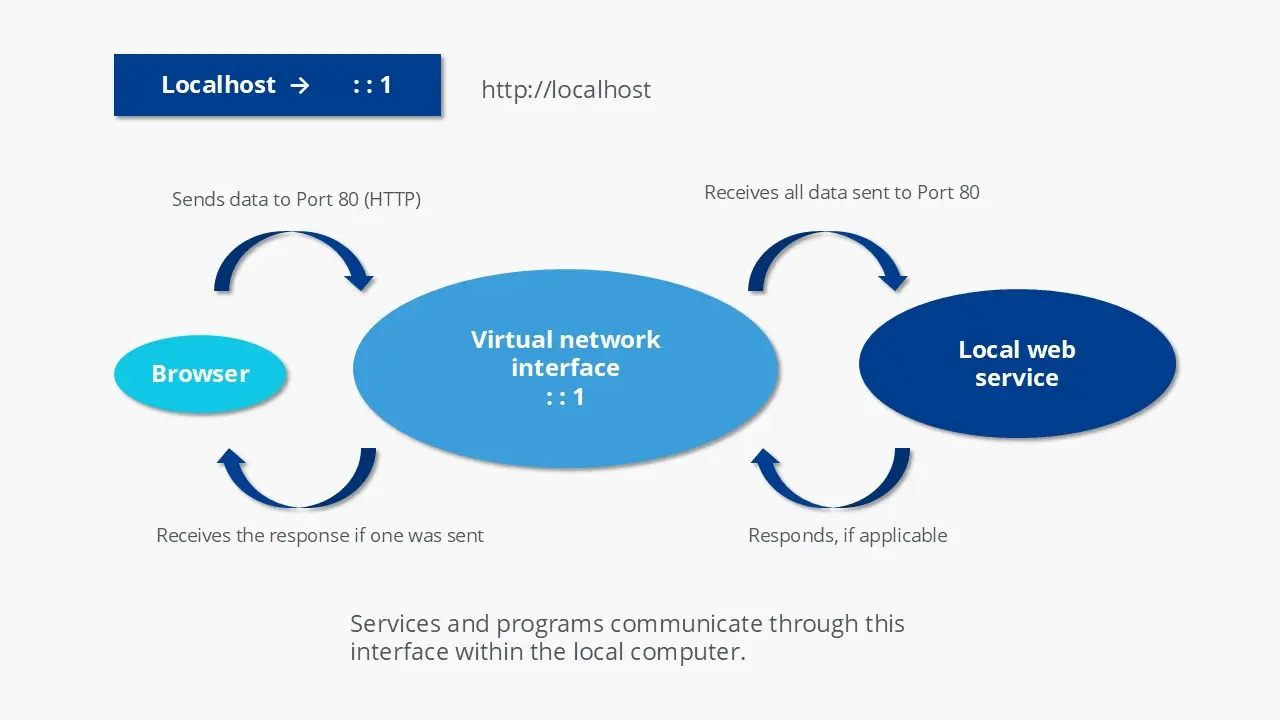
Conversely, this means that the term is only used in the context of networks. « localhost » is not just the name of the virtual server, but also its domain name. Just like .test, .example Or .invalid, .localhost is a top-level domain reserved for documentation and testing purposes. When you try to access the domain, a loopback (looping in French) is triggered. If you access http://localhost in the browser, the request will not be transmitted to the Internet through the router, but will remain in your own system. localhost has the IP address 127.0.0.1, which refers to your own server.
Domain name
Your domain in one click
- 1 Wildcard SSL certificate per contract
- Included Domain Connect feature for simplified DNS setup
IP addresses are used in a network to communicate with each other. All network participants have their own address. Data packets sent via TCP/IP can reach the correct destination when this system is used. The TCP protocol pair (Transmission Control Protocol) and IP (Internet Protocol) are some of the cornerstones of the Internet. However, TCP/IP is also used outside the Internet, in local networks. During transmission, the Internet Protocol uses the IP address and subnet mask to address subscribers on a network.
Note
The allocation of public IP addresses (accessible via the Internet) is regulated by an international organization: Internet Corporation for Assigned Names and Numbers (ICANN, in French the Corporation for Assigned Names and Numbers on the Internet). Additionally, ICANN is responsible for assigning domain names or the Domain Name System (DNS). However, some address ranges are reserved for specific purposes, such as the range 127.0.0.0 to 127.255.255.255.
Until the 1990s, IP addresses on the Internet were divided into different classes. The first class (class A) started with 0.0.0.0 (this address is also reserved) and ended with 127.255.255.255. The last block of the Class A network is 127. This important position could have been the reason why it was chosen.
In this address range, it is possible to set up a Localnet. What makes it special is not only that it is reserved by ICANN, but also that the IP addresses it contains are not uniquely assigned, unlike public addresses. How does it work? When you enter an IP address or domain name into your browser, the router normally sends the request across the Internet to the corresponding server. With 127.0.0.1 the situation is different: requests do not leave your device and remain on your local system. TCP/IP recognizes from the first block (127) that it is a reference to your own machine, which automatically triggers the loopback. This is how localhost, its dedicated IP address and access via http://localhost.
Noticed
Under IPv6, address ::1 is reserved for loopback.
A loopback device is created for loopback to your own computer to work. This is a virtual interface created via the operating system. On Unix systems, the interface is called « lo » or « lo0 » and can be displayed using the command ifconfig. A similar command for Windows is ipconfig.
Noticed
If you consider the technology independent of the localhost, a loopback can be created in an analog way: the circuits of the communication technology can then be used to check the transmission and reception paths.
What is the use of localhost?
Developers use localhost to test programs and web applications. Network administrators can also use loopback to test network connections. Another practical use of localhost is host fileswhere you can use loopback to block malicious websites.
Note
In modern cloud-based development environments, local servers are used less and less. Instead, we work with virtual machines or containers running in the Cloud. In this context, the classic use of localhost (127.0.0.1) to simulate network connections becomes less relevant, even if this localhost IP or access via http://localhost remain useful for certain specific tests.
Testing
The primary use of localhost in web servers is for programming applications that need to communicate over the Internet. During development, it's important to know if the application actually works as expected once you have access to the Internet. Other functions of localhosts are only possible if the required files are available on the Internet. For example, there is a difference between opening an HTML document on your PC or uploading it to a server and accessing it. Releasing an unfinished product without testing it doesn't make sense, so developers use loopback to test them. They can simulate a connection while avoiding the detour of the network: instead, the connection stays completely in their own system.
Another advantage of use in testing is its speed. When you send a request over the Internet, it takes over 100 milliseconds. If you ping the localhost, the maximum transmission time is only one millisecond. With this technology, you can also know whether the Internet protocol is implemented correctly or not. To test this yourself, simply open Command Prompt (Windows) or Terminal (Unix/Mac) and use the ping command. You can either send it to the “localhost” domain or directly to the IP address.
ping localhost
ping 127.0.0.1
bash
If you want to configure your own test server on your PC to address it via localhost, you must first install the right software. It's usually possible to run any standard web server on your own computer, but there is also software specifically designed for use like localhost; an example of this type of environment is the XAMPP software.
SSL certificates
Choose security
- Secure your data transfers
- Build trust with your customers
- Improve your positioning on Google
Block websites
localhost plays an important role in the hosts file. In principle, this file is a predecessor of the DNS system (Domain Name System): IP addresses can be assigned to corresponding domains. If you enter a website address into the browser, the domain name must be translated into an IP address. Previously it was the hosts file, but today you would typically use global DNS. However, the file is still present in most operating systems. With Windows you can find the file under \system32\drivers\etc\hostswith macOS and other Unix systems it is located under /etc/hosts.
If you haven't edited the file, there are probably two entries left:
127.0.0.1	localhost
::1			localhost
txt
This ensures that name resolution for localhost should not be carried out over the Internet. You can also use the file to block certain websites. To do this, enter the website to be blocked in the list and assign the IP address 127.0.0.1 to the domain. If you, or a malicious script, attempts to access the locked domain, the browser will first check the hosts file and find your entry there. Another option is to use the domain name 0.0.0.0.
The browser will then try to access the corresponding website on the server with 127.0.0.1. However, it is unlikely that the browser will be able to locate it, because the requested file will not be there. However, if you have set up your own test server, the browser can find the sample file home.htmlbut it's just your own file. If you have not set up your own test server, an error message will appear instead of the requested website. Additionally, this technology can be used to disable advertising inserts system-wide. To avoid having to make each entry manually, you can find regularly expanded hosts files on the Internet.
Note
The hosts file can have a major impact on your security when browsing the Internet. Although the file is suitable for blocking malicious websites, criminals can still manipulate it. You should therefore ensure that you do not copy entries from other websites without checking them first, and ensure that malware does not attempt to create entries without your knowledge.


