
An AI CRM is a customer relationship management system that complements customer relationship management with AI-based analytics or support functions. It can classify requests, summarize information and suggest next steps. Its usefulness depends on data quality, configuration and human control.
Summary
- An AI CRM complements traditional customer management with AI functions such as classification, summaries and response drafts.
- The typical process: collect data, analyze content, generate suggestions, verify results.
- Its usefulness depends on data quality, configuration and human control.
- If you receive many recurring service requests, workload relief may be particularly valuable.
- When it comes to data protection, the legal basis, data minimization, access rights and deletion rules are decisive; depending on usage, the Artificial Intelligence Regulation (AI Act) may also be relevant.
What are CRM and AI CRM?
CRM is the abbreviation for “customer relationship management”, or customer relationship management: companies centralize contacts, exchanges, quotes and current tasks in order to maintain relationships with prospects and customers. A classic CRM can already automate reminders, rules and reports. An AI CRM extends these functions, for example with the analysis of free texts or suggestions deduced from existing files.
“CRM AI” is not a protected or standardized function category. Some products only offer a writing assistant, while others analyze files or support multiple work steps. The main thing is therefore to know what task a given system assumes, what data it can access and whether a person verifies the results before any action. Small teams don’t have the same priorities as large sales departments; Choosing a small business CRM should be based on your own processes.
IONOS AI email assistant
Your mailbox responds automatically thanks to AI.
-
Save time: automatically respond to common emails
-
Stay available: instant responses, 24/7
-
Maintain full control: you decide what is automated
For example, a CRM brings together contact details, emails, notes and current files. Many AI functions in a CRM rely on machine learning: models spot patterns in existing data and derive, for example, classifications or priorities. For text-based tasks like summaries and draft responses, large language models (LLMs) are often used, which process and generate natural language.
AI methods can classify texts by topic, estimate the tone of a message using sentiment analysis, or create a draft response based on validated information. The system can then submit a case for review and assign it to the responsible person.
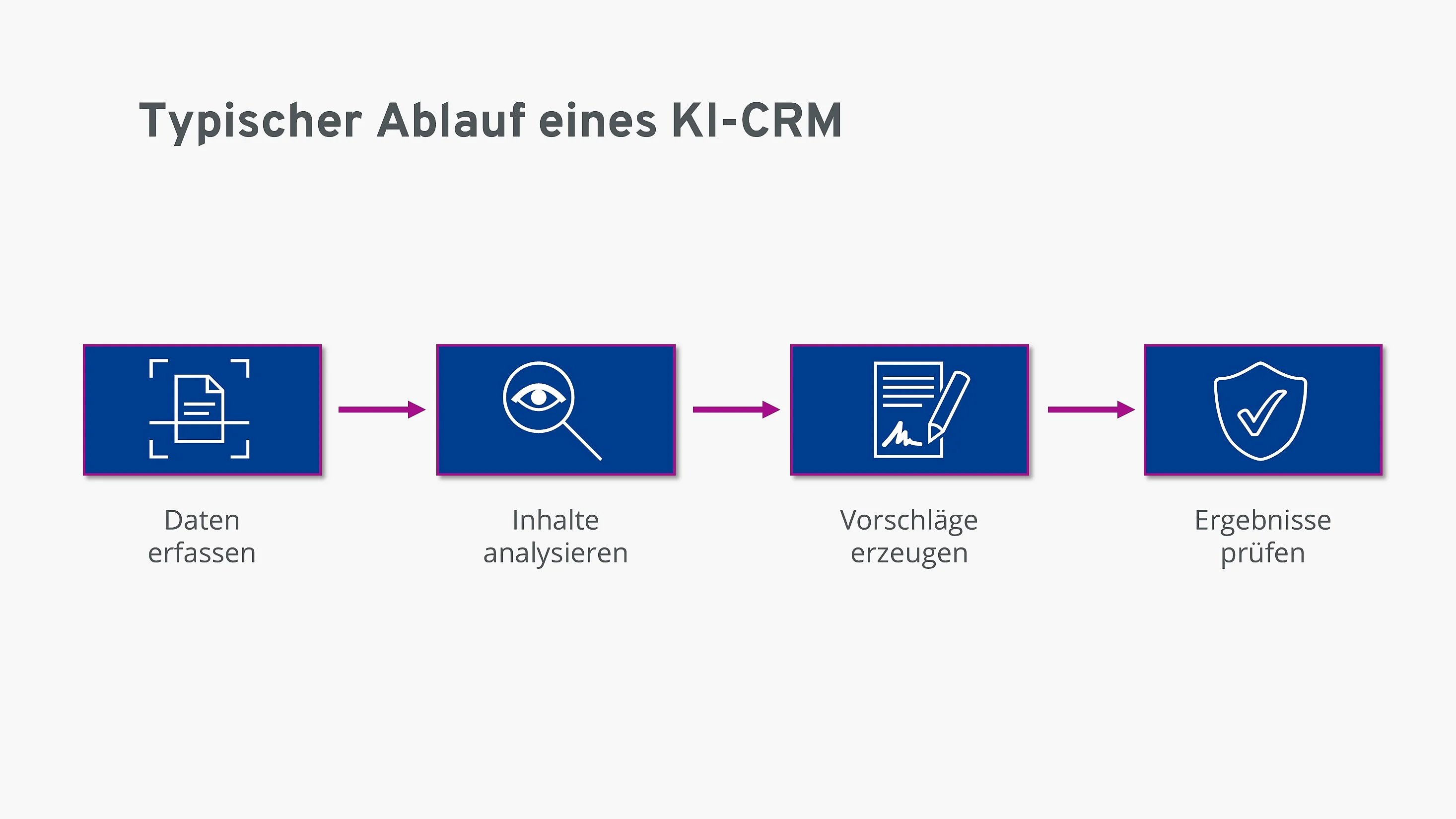
An AI CRM processes customer data, analyzes content, creates suggestions and makes the results available for human review.
The typical flow of an AI CRM can be divided into four stages:
- Collect data : CRM aggregates validated information from sources such as emails, tickets, notes and CRM entries. The AI thus has a common data base for further processing.
- Analyze content : AI classifies requests by subject or urgency, summarizes longer exchanges and can identify the tone of a message using sentiment analysis.
- Generate suggestions : based on the analysis, the system suggests, for example, a responsible person, a response or a suitable time for a follow-up.
- Check results : employees check the suggestions and decide whether to accept them, adapt them or reject them. Thus, humans remain involved in the decision-making process, particularly for important responses or sensitive files.
The exact processing differs between products: not all AI CRMs analyze calls, use a language model, or learn autonomously from each correction. Incomplete entries and ambiguous messages can generate erroneous suggestions. This is why you should always apply the principle of human in the loop: for example, employees should always validate important answers.
What functions does an AI CRM offer?
| Function | Possible use |
|---|---|
| Classification | Pre-sort requests by subject and urgency |
| Summary | Condense contact history before a callback |
| Draft response | Prepare a response based on validated information |
| Data maintenance | Report duplicates or missing information for verification |
| Prioritization | Highlight current quotes and reminders to be made |
| Analysis | Make recurring questions or developments in the service visible |
A feature is only useful if the team can understand and correct its suggestions. Customer request automation also requires clear rules for when a request is escalated to a person.
AI CRM and classic CRM: comparison
| Criteria | Classic CRM | CRM with AI functions |
|---|---|---|
| Time needed | Manual entries and rule-based processes, depending on configuration | Additional drafts and analyzes can save time; control remains necessary |
| Data maintenance | Import, required fields and rules make maintenance easier | The AI can additionally flag inconsistencies or duplicates for verification |
| Scalability | Depends on processes, automation and pricing offering | Large volumes of unstructured requests are easier to pre-sort if the quality is there |
| Costs | License, configuration and maintenance | Use of AI, verification and integrations may incur additional costs |
| Learning curve | Depends on interface and processes | Assistance can make certain steps easier; the new verification rules require handling |
The table describes typical possibilities, not guaranteed differences. A traditional CRM can also scale well, and a poorly configured AI CRM can result in more remediation work.
What are the advantages of AI in customer relationship management?
When there are many similar requests, pre-sorting and drafts can shorten response times. Reminders about current tasks reduce the time spent manually searching through folders. Summarized feedback can help inform decisions about service, sales and customer loyalty. However, success is only visible when the team compares, for example, response time, remediation rate, and customer satisfaction before and after deployment.


Who is an AI CRM useful for?
For growing teams and businesses with many recurring service requests, workload relief can be particularly valuable. Even freelancers can benefit from clear follow-up reminders and drafts. In service-intensive sectors, grouping contact history facilitates transmissions within the team. If you only manage a few contacts, check whether a simple CRM solution without additional AI features is enough. Customer loyalty measures always need a relevant reason.
What should you consider when it comes to data protection?
A CRM often deals with personal data. Companies responsible for processing need an appropriate legal basis for each purpose, should only process necessary data, limit access and define retention and deletion rules. When a service provider carries out processing on behalf of the company, the contractual framework must also be verified. Hosting in the EU alone is not enough to make the use of a CRM compliant with the GDPR (General Data Protection Regulation); data flows, sub-processors and the concrete configuration are also decisive.
In addition, the Regulation on Artificial Intelligence (AI Act) may be relevant depending on the concrete use of AI. An ordinary CRM is not a high-risk system just because of its AI component. Transparency obligations may apply in the event of direct interaction with an AI system.
First choose a clearly measurable task, such as pre-sorting a customer service inbox. Clean up your contact data, define authorized sources and responsibilities, then test the system with real records that you are authorized to use for this purpose. Contributors should correct misclassifications and decide which answers require validation. Only when quality and workload reduction are there can you add other processes.