

STARTTLS is a command to initiate encrypted communication using TLS (Transport Layer Security), without changing port. We also speak of “opportunistic TLS”.
As an extension of the TLS protocol, StartTLS allows you to add a layer of encryption while remaining compatible with clients that do not support TLS. He thus presents fewer compatibility issues. If a server does not support TLS, then the client must decide how to process the data. Another advantage: encryption negotiation is carried out automatically between client and serverwithout requiring manual intervention, even in the event of a communication fault.
With StartTLS, the connection always starts in clearon the port normally used for unencrypted communications. Only after the command is executed STARTTLS that encryption is negotiated with the client, without the need to establish a new connection. Even if the negotiation fails, no port change is required: the client can simply restart the StartTLS procedure proposed by the mail server.
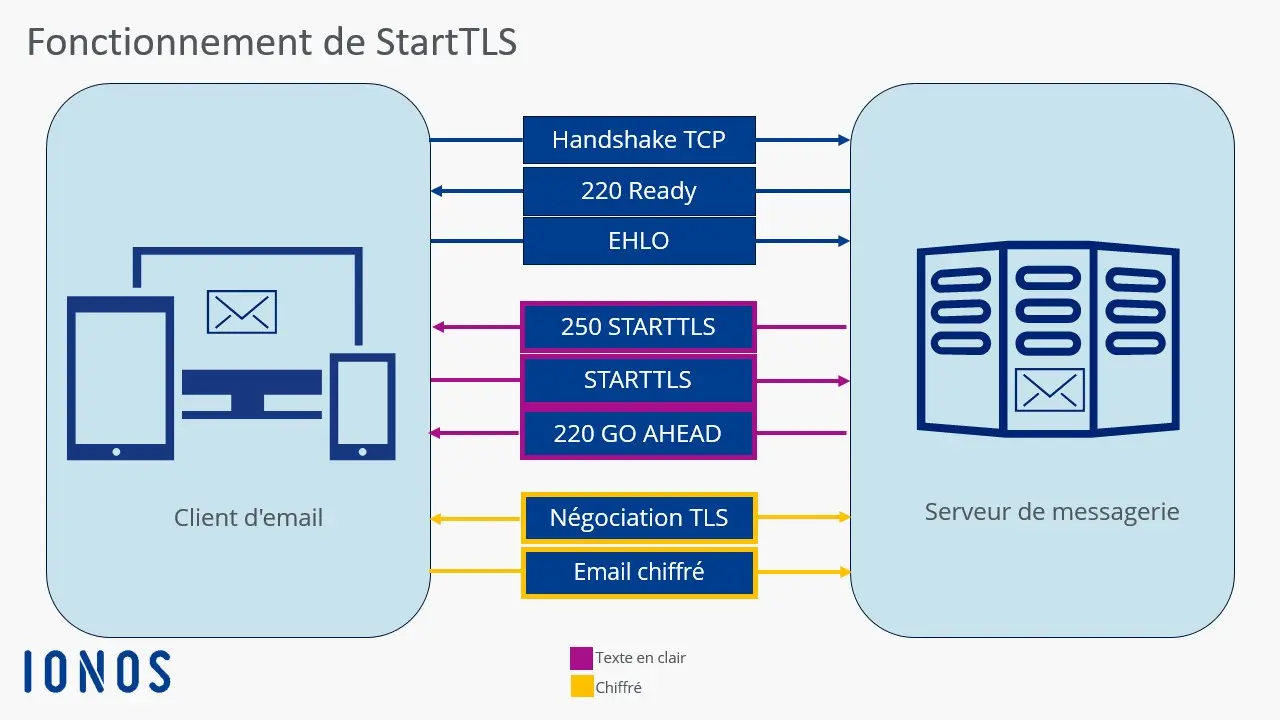
Example with an email
StartTLS is used to easily integrate encryption into the normal communication flow. You will usually find this option in the account configuration or in the settings of your email client.
Once the email is sent, communication starts:
- The client sends a request
EHLOto request encryption methods. - The mail server responds
250-STARTTLSto indicate that it accepts the StartTLS procedure. - The customer sends
STARTTLSto start encryption. - Server responds with status code
220 OK; this code signals that the server is ready to establish an encrypted connection.
Professional email address
Discover a new way to process your emails
- Email address in your name
- AI features to write perfect emails (optional)
- Secure messaging with spam protection
Application areas of StartTLS
StartTLS is a protocol extension mainly used in email communication for protocols SMTP, IMAP And POP. HTTP has its own process (specified in RFC 2817), which is very similar to StartTLS. Nowadays, however, the use of HTTPS (RFC 2818) is more common. In addition to the mentioned email protocols, StartTLS can initiate the encryption process with the following protocols:
Among Internet service providers, StartTLS is now by far the most popular email encryption method. Indeed, it allows you to use many different domains and certificates on a single server. However, StartTLS has some security vulnerabilities. For example, sensitive information likeIP address are initially transmitted without being encryptedwhich opens the door to man-in-the-middle attacks. An attacker can thus block the command STARTTLSforcing the connection to remain unencrypted, without either the user or the provider noticing.
Advantages and disadvantages of StartTLS
StartTLS presents disadvantages from the point of view of security software. Firewalls must analyze the process at the application level to differentiate between encrypted and unencrypted data. The same goes for proxies, which preferably work with separate ports, whereas with StartTLS the ports are not changed. This makes caching difficult, if not impossible.
In terms of data protectionStartTLS is far from perfect. Most email programs use the « TLS if possible » option, so the user does not know whether the connection with the email server is encrypted or not. There is also an increased risk ofman-in-the-middle attacksbecause a malicious network operator can simply filter the StartTLS extension. It can then intercept data exchanges. Indeed, if the order STARTTLS is not executed, the data is transmitted in clear text, generally without the user noticing it.
This is why it is necessary to carry out a preliminary test carefully to ensure that the server handles StartTLS well. Only from there can we use the default process. If encrypted communication fails, this is a sign of an external problem.
TLS protocols use different ports depending on the provider. Since StartTLS integrates very simply into the communication, making a port change unnecessary, the encryption procedure can be tested from a suitable console. This makes it possible to determine the ports used by each provider for StartTLS. The following command allows you to check (for example in NetCat) whether an email server accepts the StartTLS protocol as an encryption method in normal operation:
$ nc smtp.ionos.fr 587
220 mail.exemple.fr (mreue011) Nemesis ESMTP Service ready
ehlo test.local
250-mail.exemple.fr Hello test.local [80.187.86.70]
250-8BITMIME
250-SIZE 141557760
250 STARTTLS
STARTTLS
220 OK
bash
You should find the command here STARTTLS to enable encryption. We can also see that personal data, such as the IP address, is transmitted in plain text without encryption.
With OpenSSL, the command looks like this:
$ openssl s_client -starttls smtp -connect smtp.ionos.fr :587
CONNECTED(00000005)
[…]
SSL handshake has read 4650 bytes and written 1659 bytes
Verification: OK
---
New, TLSv1.3, Cipher is TLS_AES_256_GCM_SHA384
Protocol: TLSv1.3
Server public key is 3072 bit
This TLS version forbids renegotiation.
Compression: NONE
Expansion: NONE
No ALPN negotiated
Early data was not sent
Verify return code: 0 (ok)
---
250 STARTTLS
bash
With SMTP, on the other hand, theauthentication is not as easy. It is most often made possible by the procedure AUTH PLAINwhich requires encoding of access data in Base64. This consists of generation with the command in PERL language '$ perl -MMIME::Base64 -e 'print encode_base64("\000user-ju\000secret")' of a code which is then transmitted to the SMTP server (AUTH PLAIN [Code]). If the server then responds with Authentication succeeded (code included), the test for StartTLS is successful. Once authentication is validated, other SMTP commands can be executed normally.
Advice
To test StartTLS with servers or protocols that are not compatible with OpenSSL, you can also use the gnuts-cli tool in the package gnuts-bin.


