

THE greylisting (in French “graylisting”) is an effective method for blocking the receipt of spam. It runs directly on the recipient's mail server and requires no special configuration from either the sender or the recipient.
Where is greylisting used?
Unlike traditional spam filters, greylisting directly prevents delivery of obvious spam. Based on a simple process, it consumes few resources and easily integrates into modern security architectures such as Zero Trust Or Defense in Depth. This method is mainly used to counter unauthorized mass sending of unwanted emails.
THE Unsolicited Bulk Emails (UBE) designate non-personalized emails sent in massoften from purchased or stolen address lists.
These mailings usually come from hacked computers belonging to compromised users. Connected together in botnets, these devices are used to distribute large quantities of spam, most of the time with spoofed sender addresses.
On the other hand, greylisting is not not designed to block the Unsolicited Commercial Emails (UCE), i.e. individualized commercial emails sent by real companies or professionals. For this type of messages, we favor filters based on content and blacklisting.
Secure email address for your digital privacy
- Professional data protection and security
- Email encryption with SSL/TLS
- Antivirus protection with firewall and spam filters
- Daily backups, daily protection
The principle of greylisting is based on the ability to filter potentially unwanted emails during the delivery process. To better understand how it works, let's first see how sending an email takes place.
Email transmission explained simply
Sending an email is based on Simple Mail Transfer Protocol (SMTP). In summary, here are the main steps of the process:
- The sender writes his message using a Mail User Agent (MUA), i.e. local email software or web interface.
- For sending, the MUA establishes an SMTP connection with the Mail Transfer Agent (MTA) of the sender. This software, installed on an SMTP server, is responsible for transmitting emails.
- The sender's MTA then sends the message to the recipient's MTA. If the latter accepts the connection, the email is deposited in the recipient's mailbox.
- When synchronizing via IMAP or POP3, the message then appears in the inbox.
Greylisting Point of Action
Greylisting occurs at third step of the sending process, when the recipient's Mail Transfer Agent (MTA) receives the message. Before accepting full delivery of the email, the MTA already has three key pieces of information:
- the IP address of the sending mail server
- the sender's email address, transmitted via the SMTP command
MAIL FROM - the email address of the recipient(s), indicated by the SMTP command
RCPT TO
These elements, known even before the content of the email is transmitted, are called envelope data. THE Mail Transfer Agent saves this envelope data for each incoming message in a specific list called Greylist.
Example of entry in a Greylist:
| IP address | Sender | RECIPIENT |
|---|---|---|
| 192.0.2.3 | anne@exemple.com
|
louis@exemple.net
|
Convenient and secure email hosting services
- Personalized email address
- Access to emails from anywhere
- Highest safety standards
First and second delivery attempt
When a combination of envelope data appears for the first time, the recipient's Mail Transfer Agent (MTA) temporarily rejects the email. An error code is then sent back to the sending server, indicating that a technical problem has occurred and prompting it to try again after a set time.
A legitimate MTA, compliant with SMTP standards, will naturally retry the send. During the second attemptthe envelope data being already known in the Greylist, the email is this time accepted and transmitted to the inbox.
On the other hand, servers used for mass spam sending generally do not retry. This is where greylisting protection comes into its own: no second attempt is made, so spam is never delivered. The user doesn't notice anything; an elegant and discreet method for blocking unwanted emails.
Greylisting: detailed process
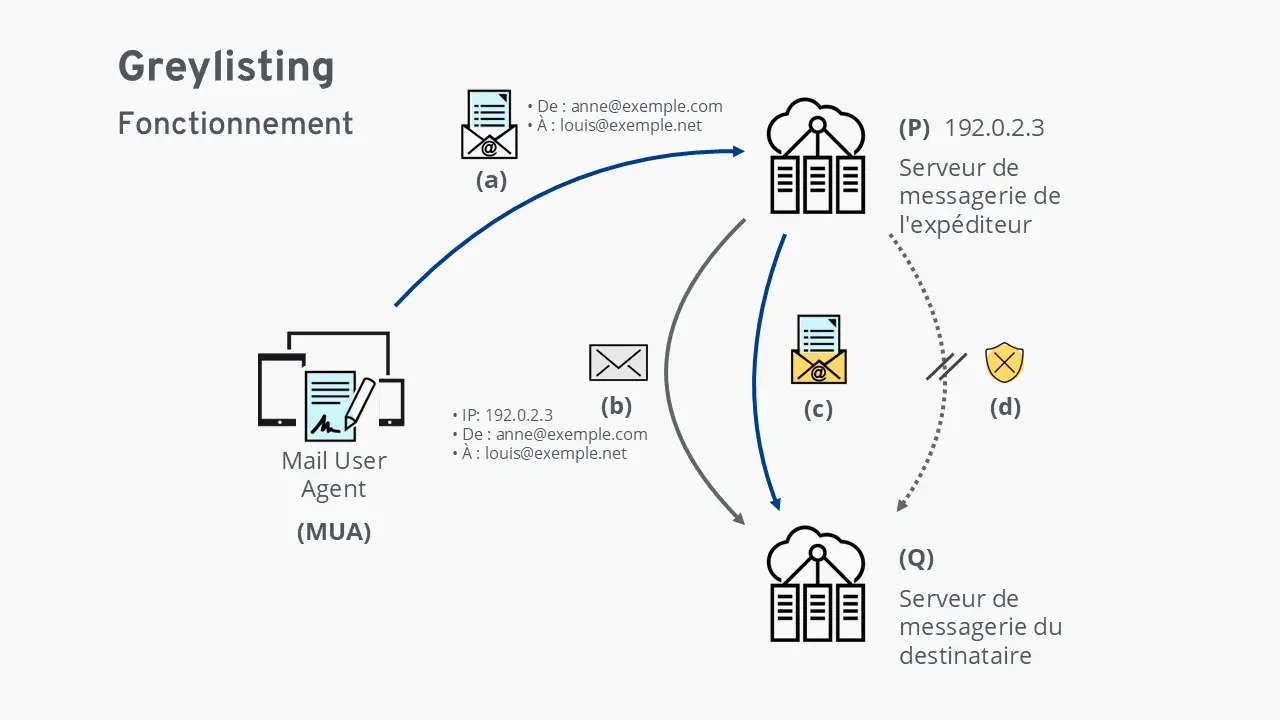
(has) The Mail User Agent (MUA) sends an email to the sender's mail server (P).
(b) The sender's server (P) transmits the message to the recipient's server (Q).
This checks the envelope data: the IP address of the sending server and the email addresses concerned.
If the combination of these three elements is unknown, the server (Q) temporarily rejects the messageciting a technical error.
It then records this data in the Greylist: the email is then “greylisted”.
(c) If it is a legitimate shipment, the sender's server (P) will retry sending after a certain delay.
The data now being recognized, the recipient's server (Q) accepts and delivers the message.
Optionally, the server can add this data to the whitelist (whitelisting), thus allowing the immediate delivery of future corresponding emails.
(d) In the case of an illegitimate sending (spam), no new attempt is made.
The greylisting then fulfills its role of spam barrierpreventing the message from being delivered to the recipient.
Greylisting as a component of comprehensive spam protection
Greylisting is generally used in complements other anti-spam technologies. Associated with protocols such as Sender Policy Framework (SPF), the DomainKeys Identified Mail (DKIM) and the Domain-based Message Authentication, Reporting and Conformance (DMARC), it helps to effectively secure email traffic against the most common abuses.
Combining greylisting with other methods
Greylisting is particularly effective when combined with whitelisting and blacklisting. Here is an example illustrating the timing of delivery attempts on a receiving mail server:
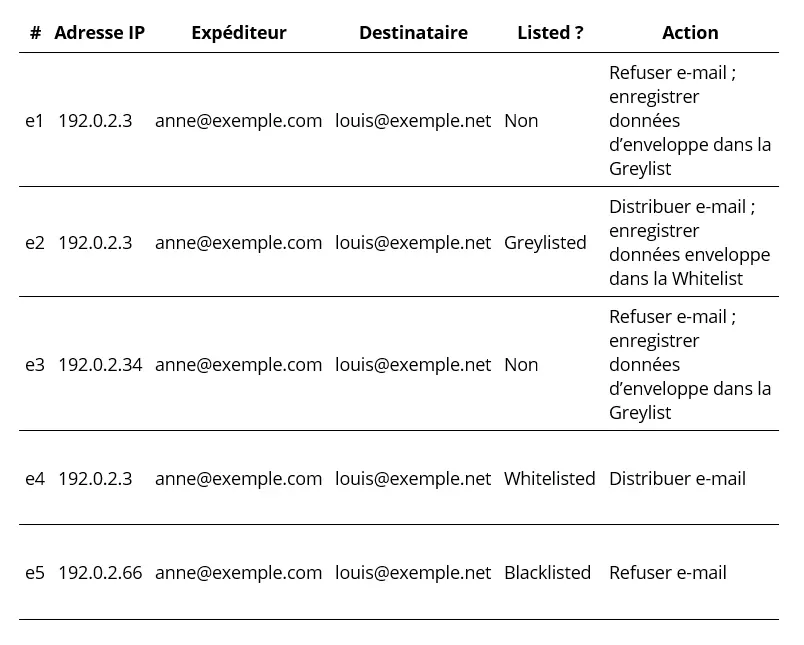
e1 An email from an unknown sender arrives on the server. The Mail Transfer Agent temporarily refuses delivery and stores the envelope data in the greylist.
e2 On a subsequent attempt, another email from the same sender to the same recipient is received. Since the envelope data is already present in the greylist, the email is accepted and delivered. This data is then added to the whitelist.
e3 Later, the IP address of Anne's SMTP server changes; previously 192.0.2.3it becomes 192.0.2.34. This new shipment is then treated as coming from an unknown sender and is placed on the greylist.
e4 During a subsequent sending, Anne's SMTP server returns to its original IP address (192.0.2.3. As this combination is already on the whitelist, the email is immediately delivered without delay.
e5 A delivery attempt comes from the server 192.0.2.66. This server is listed as malicious in the blacklist; delivery is therefore refused. It is likely that the sender address anne@exemple.com has been usurped (spoofing).
What are the advantages and disadvantages of greylisting?
| Advantage | Inconvenience |
|---|---|
| ✓ No user configuration required | ✗ Don't always know that greylisting is enabled |
| ✓ Does not normally cause any loss of emails | ✗ In rare cases, legitimate emails may be blocked |
| ✓ Acceptance time helps identify malicious senders and add them to the blacklist | ✗ The delay may make users doubt the proper functioning of the server |
| ✓ The delay protects against new, yet unknown malware | ✗ May be too slow for temporary emails like password reset links |
| ✓ Less resource intensive than most spam filters | |
| ✓ Highly efficient technique that significantly reduces the load on mail servers globally |
What are the problems with greylisting?
Despite its many advantages, greylisting also has certain limitations:
- The IP address of the sending SMTP server must remain stable. If the IP address changes, the receiving server considers the attempt to come from an unknown sender and the email is “greylisted” again.
- Delivery failures may occur due to incorrect configuration. If the sending server does not respect SMTP standards or does not retry delivery, the email will never be delivered.
- Spammers can theoretically bypass protection if they have sufficient resources. In theory, they can schedule multiple referrals to pass greylisting, but the logistical cost makes this method uneconomical.
- Temporary emails may become unusable. For example, a password reset link sent from an unknown sender may be delayed by greylisting, which may expire before it is received.
- Lack of visibility for users. In some modern Cloud solutions, greylisting is enabled by default without direct access to its configuration. Occasional email delays may therefore seem unexplained to users.
Secure email address for your digital privacy
- Professional data protection and security
- Email encryption with SSL/TLS
- Antivirus protection with firewall and spam filters
- Daily backups, daily protection


