

SFTP is a secure network protocol for transferring, managing and storing files over encrypted connections. Based on the SSH protocol, it protects data from unauthorized access during transfer. Unlike classic FTP, SFTP guarantees fully encrypted communication.
Dedicated servers
Performance and innovation
-
Latest generation processors
-
High performance dedicated hardware
-
ISO certified data centers
What is SFTP?
SFTP means SSH File Transfer Protocol Or Secure File Transfer Protocol and is a secure method for transferring files over the Internet or a local network. It is based on the SSH protocol, (Secure Shell), which ensures reliable authentication of communication partners. Thus, the data transmitted such as access identifiers are protected against any unauthorized access. Unlike classic FTP, where information circulates in the clear, SFTP guarantees that all data is encrypted.
SFTP is used wherever sensitive data needs to be transferred securely:
- Exchanging files between servers
- Website backups
- Web hosting project management
Users can access their server through an SFTP program in order to download, upload, rename or delete files. As the protocol uses port 22, also reserved for SSH, no separate firewall configuration required. Additionally, SFTP supports modern authentication methods such as SSH keys, providing a higher level of security than simple passwords.


To establish a connection via the SSH File Transfer Protocol, a SSH access must be activated on the host’s server. The necessary access information (server address, user name and password) is entered into the (S)FTP program used by the client. When connecting for the first time, the server verification key is displayed and then saved for subsequent sessions. The client can thus authenticate automatically at each connection. If an unknown entity attempts to communicate without the correct key, the connection is immediately interrupted.
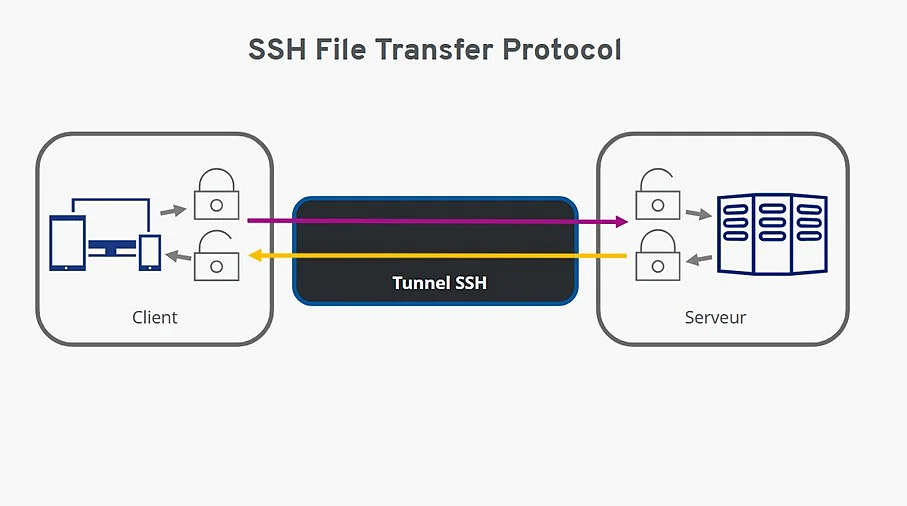
With two-way encryption, data travels through the SSH tunnel during the SSH File Transfer Protocol.
An encrypted SSH tunnel runs between the client and the server, within which theauthentication and data transfer. Thanks to this end-to-end encryption, no malicious person can intercept or alter the data. These therefore arrive intact to their recipient. If a modification attempt is detected, SSH immediately terminates the connection.
Data transmission with the SSH File Transfer Protocol protects against:
- Changes to the IP address of a data packet, also called IP Spoofing
- Redirects to a hacker’s IP address (DNS-Spoofing)
- Interception of access data transmitted in plain text
- Manipulation of sent data
Note
SFTP does not, however, protect against careless handling of data or access keys: if credentials are improperly stored, shared or compromised, no layer of encryption will be able to prevent unauthorized access.
Using SFTP
In the (S)FTP program, the SFTP protocol is selected directly in the access data entry area. In the FileZilla client application, this option is found in the Server Manager. In most cases, there is no need to manually specify a port: as soon as SFTP is chosen, FileZilla automatically sets the port to 22.

In FileZilla, SFTP protocol is selected for secure transfer.
During the first connection via the SSH File Transfer Protocol, the SFTP client displays a message conforming to the SSH security standard. Check the server address carefully. The right port (22) is identifiable in the displayed line, for example: home….-data.host:22.
By checking “Always trust this server, save this key” then confirming with “OK”, the server key is memorized and the encrypted connection is established.
During subsequent connections, no new validation is necessary: the SFTP client automatically identifies itself to the server with the recorded key. This digital signature ensures encryption of all transmissionsincluding initial login data.
The FTP program status window then informs in real time of the progress of the transfers (upload or download).
What is the difference between SFTP and FTP?
The essential difference between FTP and SFTP lies in the securing the transfer. With SFTP, authentication and all exchanges between the client and the server are encrypted via SSH. Even if an attacker intercepts the traffic, the data remains unusable. In addition, the SSH File Transfer Protocol automatically cuts the connection in the event of manipulated credentials or an attempted attack.
In summary, here are the main differences between FTP and SFTP:
| FTP | SFTP | |
|---|---|---|
| Number of channels used | 2 separate channels | 1 single channel |
| Encryption standard | None | SSH-based encryption |
| Authentication encryption | ✗ | ✓ |
| Encryption of data transmission | ✗ | ✓ |
| Risks of attack (eavesdropping, manipulation) | ✓ | ✗ |
Even though SFTP guarantees a high level of technical securitythis must be reinforced both on the client side and the server side thanks to additional security measures. This includes in particular:
- The location and physical protection of SFTP servers
- Secure management of user data and access keys
Careless handling of data or identifiers can in fact negate the benefits of the protocol, and inevitably leads to security risks.


