

HTML colors are used to select the colors of backgrounds, texts or frames in an HTML document. A correct choice of colors improves the design and readability of a website. There are three different ways to define these colors; discover them by reading this article!
HTML colors, what are they?
HTML colors, or HTML colorsare used to define the color values of certain elements in an HTML document. You can customize the background HTML, outlines and text with simple adjustments made in the area using the tag.
Web Hosting
State-of-the-art web hosting at the best price
- 3x faster, 60% savings
- High availability >99.99%
- Only at IONOS: up to 500 GB included
HTML colors: methods for defining HTML colors
There are three different, but equivalent, methods for setting HTML colors. You will discover in the following paragraphs what differentiates these three variants.
Color Names
In total, a fairly wide HTML color palette is supported by modern browsers: no less than 140 color names ! To use them, simply insert the corresponding English name inside the code. Besides standard values like “ Blue « , » Gray » Or » Red ”, more specific values like “ Chocolate « , » Cornsilk » Or » DarkSeaGreen » are also possible.
Advice
In this w3schools articleyou will find a list of all available HTML color names.
Hexadecimal color codes
In HTML, hexadecimal color codes are also used. They consist of a six-digit hexadecimal numberidentified by a hash mark (#). The numbers 0 to 9 and the letters A to F are used. In this hexadecimal number, the proportion of red, green and blue colors is expressed in pairs, 00 being the smallest value and FF the biggest. The blue color is therefore expressed by the hexadecimal code #0000FFwhile a dark pink (DeepPink) has the value #FF1493. At both ends of the spectrum is black (#000000) and white (#FFFFFF).
RGB values
Just like defining colors with hexadecimal color codes, defining HTML colors also works using RGB color codes. These are also defined by their proportions of red, green and blue, the intensity of a component can be understood between 0 and 255. For example, you define the color blue with the code rgb(0, 0, 255)cyan with rgb(0, 255, 255) and pink with rgb(255, 20, 147).
HTML colors: syntax and examples
Finally, we illustrate the syntax and operation of the different methods of specifying colors in HTML with some practical examples.
Change background colors
If you want to change your background colors in HTML, you need the attribute style and CSS property background-color. The syntax is as follows:
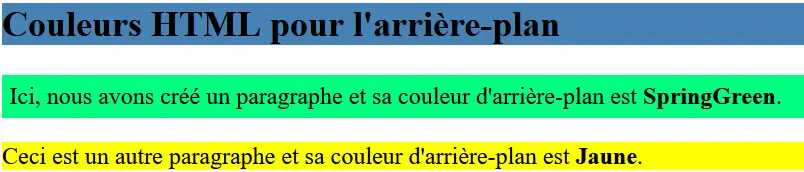
In the following example, we use the color names to set the background color of the title
Couleurs HTML pour l’arrière-plan


Ici, nous avons créé un paragraphe et sa couleur d’arrière-plan est SpringGreen.


Ceci est un autre paragraphe et sa couleur d’arrière-plan est Jaune.
html
Customize the color of text
If you want to change the color of texts on your web pages, it works on a similar principle. In this case, however, you are working with the HTML property color. The syntax is as follows:
For the color indication in this example we use the hexadecimal values HTML colors for illustration. We define a color OrangeRed (#FF4500) as the font color for the title. The first paragraph will be colored MidnightBlue (#191970) and the second colored paragraph Indigo (#4B0082):
Ce titre est OrangeRed


Ceci est un paragraphe et son texte est MidnightBlue.

Ceci est un deuxième paragraphe avec la couleur de texte Indigo.
html

Set border color values
You can also modify the borders as you wish with HTML colors. Besides the property borderyou can use other parameters to define the frame structure. In this case, the syntax looks like this:
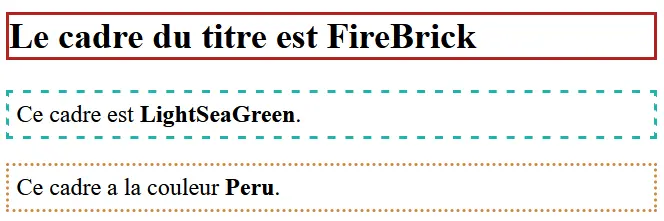
In the following example, we will use the third variant of color definition: the RGB values. The frame of our title receives the value rgb(178, 34, 34) (FireBrick). The two paragraphs are framed by rgb(32, 178, 170) (LightSeaGreen) And rgb(205, 133, 63) (Peru).
Le cadre du titre est FireBrick

Ce cadre est LightSeaGreen.


Ce cadre a la couleur Peru.
html
Domain name
Your domain in one click
- 1 Wildcard SSL certificate per contract
- Included Domain Connect feature for simplified DNS setup


