A hypervisor is software or firmware that creates and manages virtual machines by disregarding the hardware resources of a physical computer and making them accessible to several operating systems simultaneously. Instead of building a complete system (including equipment and operating system based on it), you simply create a virtual version of it, the illusion of a PC environment.
When you create a virtual machine (VM), it runs on the basis of a real machine, like a PC. The VM is therefore dependent on physical material. This is why there is a layer responsible for management between the two levels: the hypervisor. The hypervisor is software that takes care of theResources allocation. Also known as Virtual Machine Monitor (VMM) or virtual machine monitor, it allocates resources within the system. In this way, several different virtual machines can operate on a host system, because the hypervisor ensures that they do not disturb each other and that all have the necessary capacities.
The hypervisor therefore creates a abstraction layer Between the equipment and the operating systems that run there. To do this, it divides material resources into logical units and makes each VM believe that it has its own environment. VM behaves as if they were running directly on real equipment, even if they share their resources with other VMs.
Note
The strict separation between the different virtual machines not only ensures a good distribution of resources, but also strengthens security. Thanks to the hypervisor, it is guaranteed that an invited system cannot access the files of another invited system. This is particularly important during tests: thus, a defective program cannot damage other test environments.
Memory management
During CPU virtualization, hypervisor uses techniques such as Time-Slicing To fairly distribute the computing power between VMs. Modern processors have special virtualization functions (for example Intel VT-X or AMD-V) which support the hypervisor and reduce the general costs.
On the other hand, the RAM (RAM) is managed by pagination and mapping techniques. The hypervisor attributes virtual memory addresses to physical memory blocks, so that each VM only sees its own memory area. When memory is rare, it can use mechanisms such as theovercommitment memory or ballooning To effectively distribute memory between VMs.
Management of E/S and peripherals
Virtual machines access hardware peripherals such as hard drives, network cards or graphics cards via virtual interfaces. The hypervisor emulates these peripherals or transmits the requests directly to the physical equipment (direct E/S techniques or Pass-Through). This ensures a balance between compatibility and performance.
Insulation and safety
One of the main advantages of virtualization is the insulation between VMs. Each VM works in its own environment, so errors or attacks in a VM have no direct impact on other virtual machines or the host system. The hypervisor uses various safety mechanisms to ensure strict separation, including memory protection, access controls and techniques of sandboxing.
Advice
If you also want to use a virtual machine, you have the choice between different virtualization software. For end users, virtualbox or hyper-v, Microsoft's virtualization solution, for example is an appropriate choice. For large companies, the virtualization suite of VMware Broadcom is one of the possible choices.
The different types of hypervisors
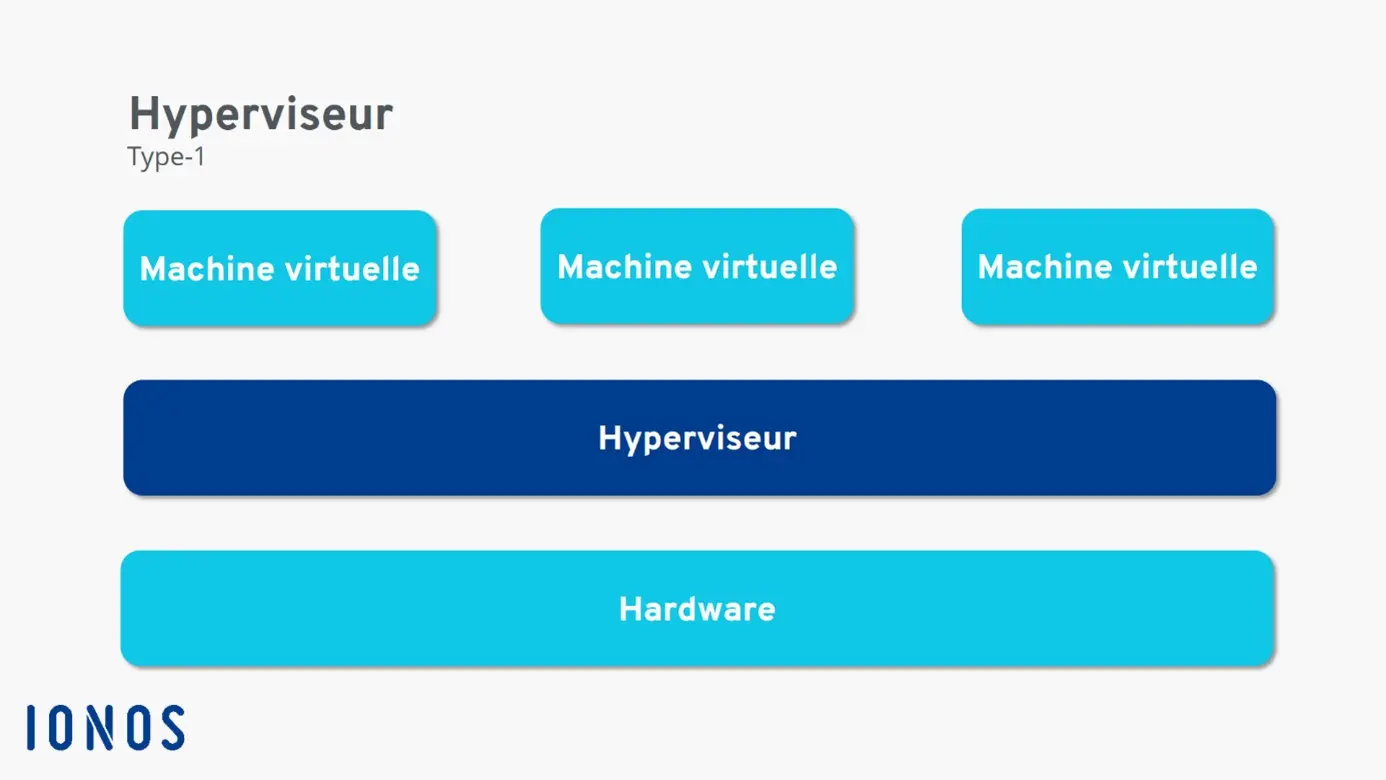
There are two different types of virtual machine monitors: type 1 and type 2 hypervisors. Each has specific advantages. The first variant is also the oldest. Already in the 1960s, virtualization attempts were made with this technology.
Type 1 hypervisor
The first type is called Bare Metal Hypervisor or native hypervisor. This VMM form is installed directly on physical equipment And is not connected to the host operating system. Therefore, it must include any peripheral pilot itself. The consumption of resources of a type 1 hypervisor is relatively low because the computing power should not go through the host operating system. This type of hypervisor is mainly intended for users who want to create a virtualization server. A type 1 hypervisor is too complex for small projects intended for individuals.
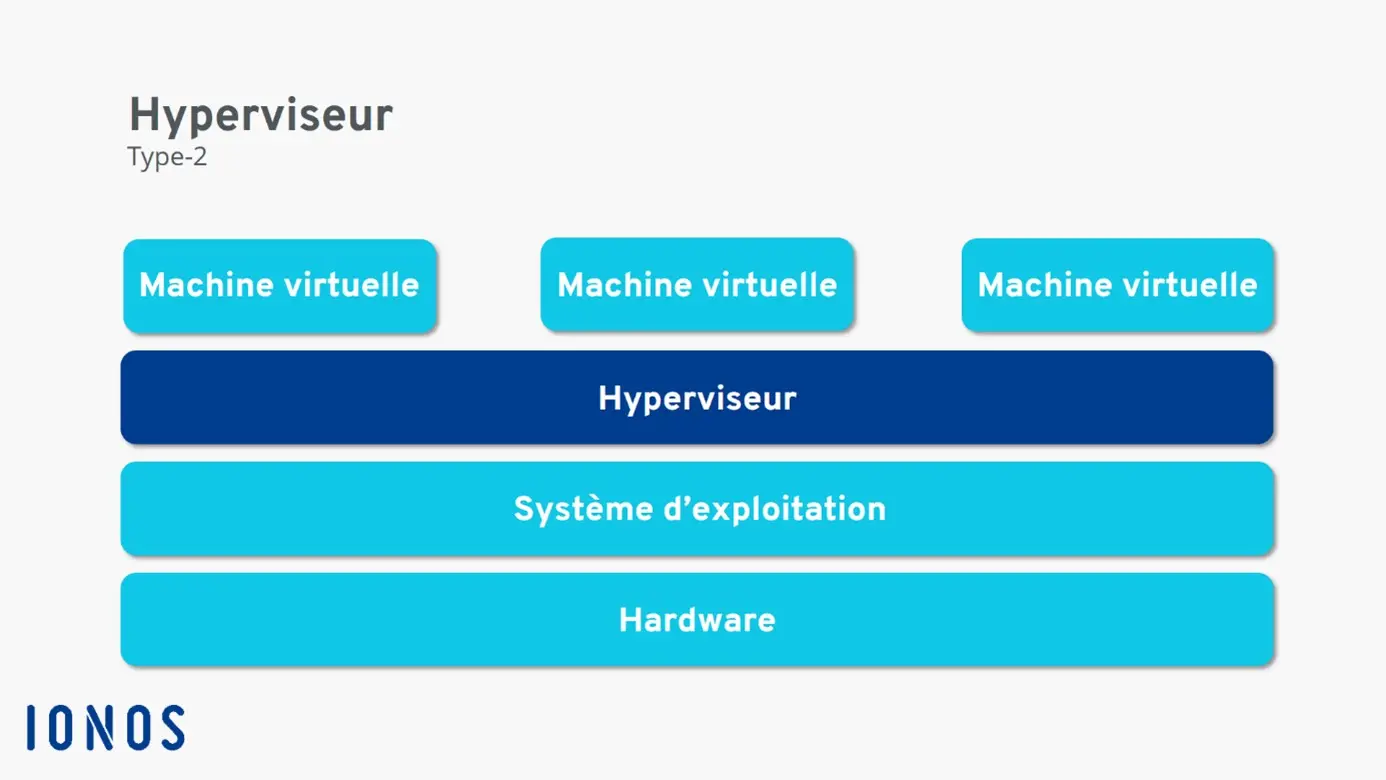
Type 2 hypervisor
The second variant (also called Hosted Hypervisor)* requires an existing operating system*, which in turn is based on physical material. A type 2 hypervisor is therefore installed like any other program. The VMM then manages virtualization. Device drivers should not be installed in the hypervisor, since the real operating system can simply transmit them to the software. However, this convenience is at the expense of performance. A large part of the resources is already consumed by the host operating system. Due to their simple installation and configuration, type 2 hypervisors are perfectly suited to the smallest projects.
Compute Engine
The ideal IAAS solution to manage your workloads
- VCPU with advantageous costs and efficient dedicated hearts
- Without commitment for more flexibility
- Assistance by experts 24/7 included